Easily Find Qantas & Velocity Reward Availability with Seats.aero

Finding reward seat availability can be one of the most difficult and frustrating aspects of collecting frequent flyer points. It’s relatively easy to earn points, but redeeming them to fly when and where you want can be a bit more of a challenge.
Luckily, there are now lots of award search tools that can make it easier to find that elusive award availability!
In addition to the original award search tools – the likes of KVS Tool, Award Nexus and ExpertFlyer – there are now some rather nifty next-generation tools such as:
- SeatSpy
- AwardLogic
- Point.me
- Reward Flight Finder
- Virgin Atlantic’s Reward seat checker
- Award hacks (Star Alliance award search tool)
- AwardFares
- PointsYeah
- Roame
- gyozaflights.com
- Seatfinder
- Flight Seats
- AwardTool
As you can see, there’s now a lot of competition for tools that help with award searches. Overall, they seem to be getting better and better. But my personal favourite award search tool is still seats.aero.
Why I like Seats.aero
With Seats.aero, you can see award availability across many different routes and dates on a single page. You don’t have to search for one route at a time. And most importantly, it works.
The owners seem to be investing a lot into making it a genuinely great tool. And they’ve been busy lately adding lots of extra features such as GDS Tools – the likes of which you might have previously used ExpertFlyer to access.
With a free account, you can instantly see award availability across the next two months. By upgrading to a Pro subscription, you can view available seats over the next year.
When searching with seats.aero, the results are almost instant. You can then easily sort and filter your results to find options that you really want. You can also set up award seat alerts, and instantly view flights to or from any airport that’s covered by the site.
This is a seriously powerful award search tool, and one that I personally use. It has saved me a lot of time.
Seats.aero supports Qantas, Velocity and 20+ other programs
Seats.aero currently shows award seats that are available to book online through 24 frequent flyer programs. This includes programs across the Oneworld, Star Alliance and SkyTeam alliances. It also supports programs like Emirates Skywards and Virgin Atlantic Flying Club, which both partner with Amex Membership Rewards in Australia.
For Australians, the most useful programs that seats.aero supports are Qantas Frequent Flyer and Virgin Australia Velocity. You can instantly identify seats that are available for booking as Velocity Reward Seats on the Virgin Australia website, and Classic Flight Rewards on the Qantas website.

Which other frequent flyer programs does seats.aero support?
Here’s a full list of the frequent flyer programs supported by seats.aero, at the time of writing:
- Aeromexico Club Premier (SkyTeam)
- Air Canada Aeroplan (Star Alliance)
- Air France/KLM Flying Blue (SkyTeam)
- Alaska Atmos Rewards (Oneworld)
- American Airlines AAdvantage (Oneworld)
- Azul Fidelidade
- Copa ConnectMiles (Star Alliance)
- Delta SkyMiles (SkyTeam)
- Emirates Skywards
- Ethiopian ShebaMiles (Star Alliance)
- Etihad Guest
- Finnair Plus (Oneworld)
- GOL Smiles
- JetBlue TrueBlue
- Lufthansa Miles&More (Star Alliance)
- Qantas Frequent Flyer (Oneworld)
- Qatar Airways Privilege Club (Oneworld)
- SAS EuroBonus (SkyTeam)
- Saudia AlFursan (SkyTeam)
- Singapore Airlines KrisFlyer (Star Alliance)
- Turkish Miles&Smiles (Star Alliance)
- United MileagePlus (Star Alliance)
- Virgin Atlantic Flying Club (SkyTeam)
- Virgin Australia Velocity
How to use Seats.aero
Here’s an overview of how to get the most from seats.aero…
The Explore feature
In the “Explore” mode, you can search for award availability using any of the frequent flyer programs listed above. In the example below, we’ll use Qantas Frequent Flyer.
You can view flights from anywhere to anywhere, or filter by region (Oceania, Asia, Europe, etc.). If you have a free account, you’ll then see any award availability that matches this criteria for departure dates within the next two months. If you have a Pro account and select the “Full year” filter, you’ll see availability for the next year.
The minimum number of Qantas points required to book a seat on that route and date will be shown for each cabin class with availability. Results shown in green are direct flights, while blue boxes indicate indirect flights. You can hover your mouse over the box to see which airlines have availability.
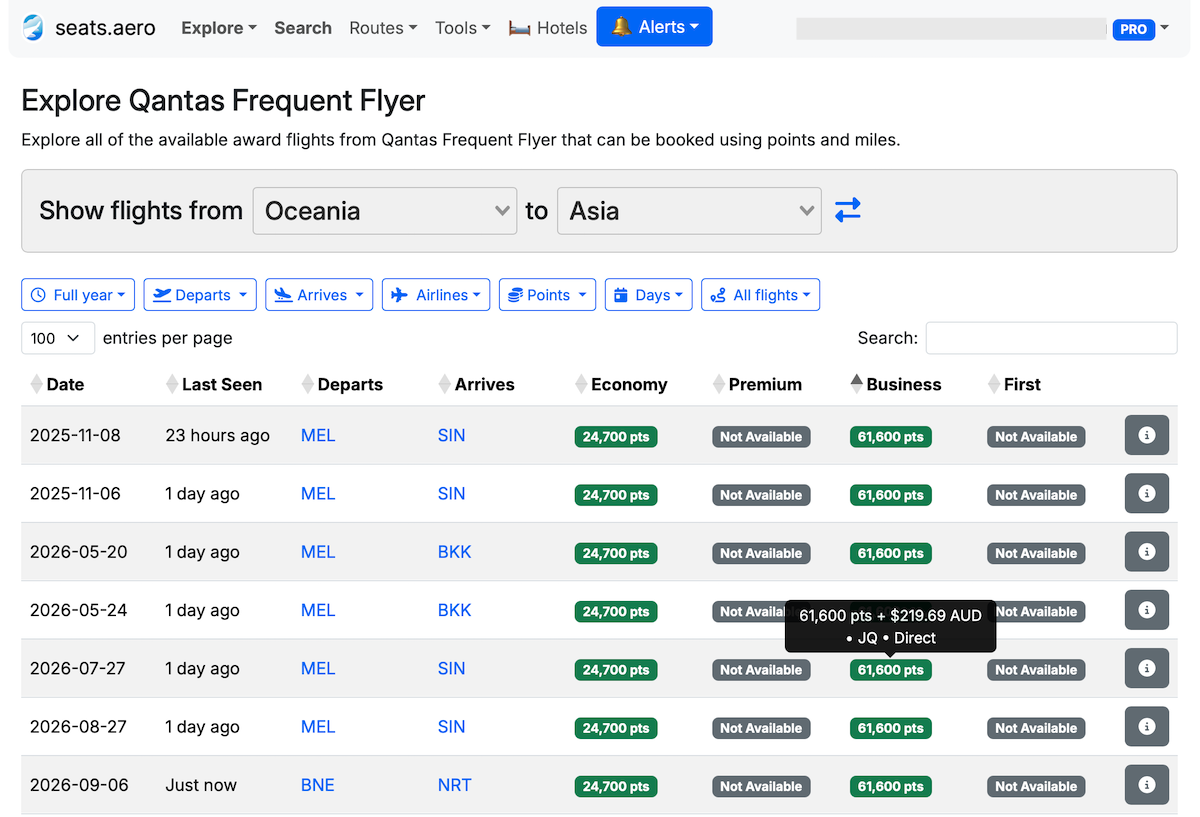
Note that seats.aero uses IATA airport codes such as “AKL” for Auckland and “SYD” for Sydney. If in doubt, you can always look up the airport codes or consult our guide to IATA airport codes.
By default, the search results are in order by departure date, with direct flights also shown before indirect options. But you can use other criteria to sort the results by clicking on the relevant heading. For example, if you want to show flights with Premium Economy availability at the top, click on “Premium”.
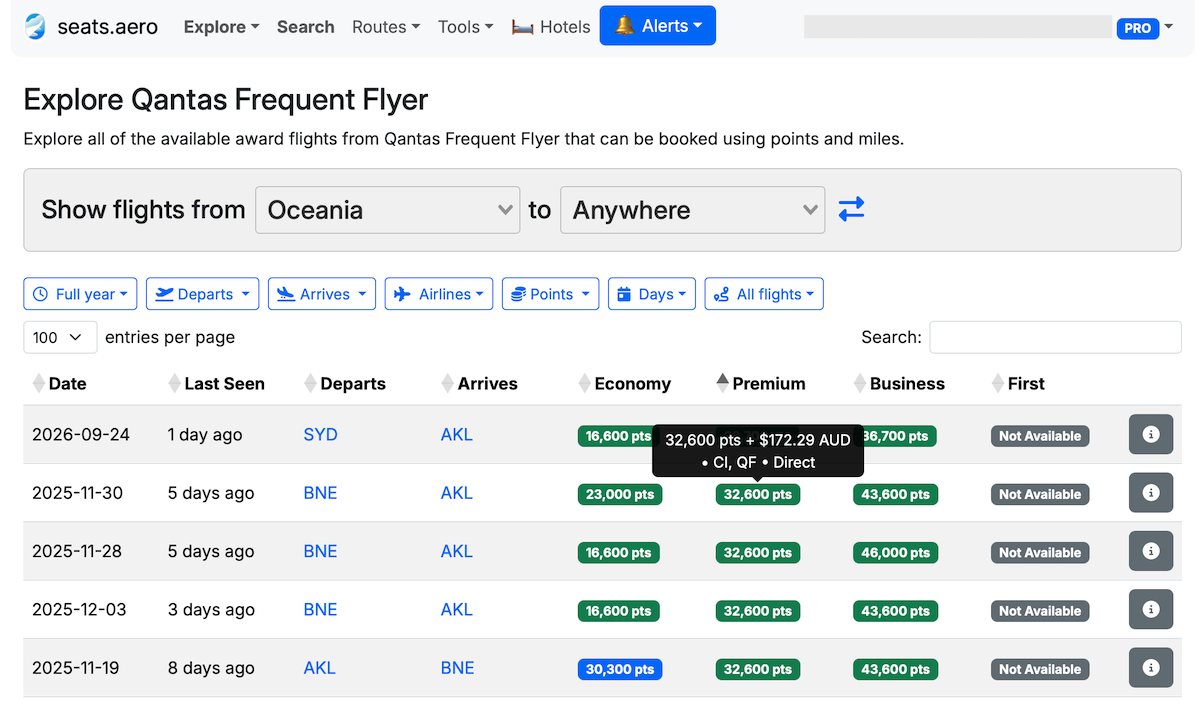
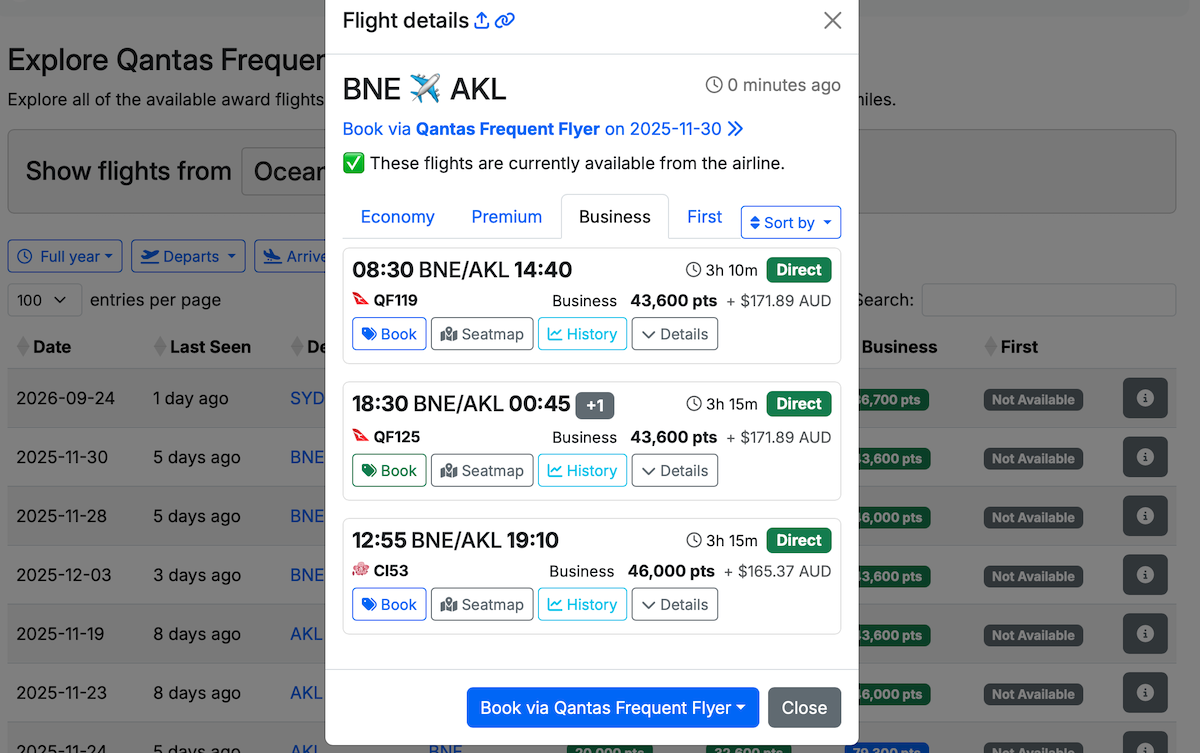
There may be one or more flights with award seats available on each date and route shown in the search results. To view more information about the available flights, simply click on the “i” box to the right. This will then bring up a box with more details about the flight times and pricing:
If you have Velocity Points and you’re looking for award availability to North America, for example, you can select “Virgin Australia Velocity” from the Explore menu. Then, adjust the drop-down options to show flights from Oceania to North America. This should then display all United and Air Canada availability from Australia or New Zealand to the USA or Canada. (Unfortunately, these days it’s unlikely you’ll find any seats on United that aren’t in Economy.)
Looking for seats to/from specific airports
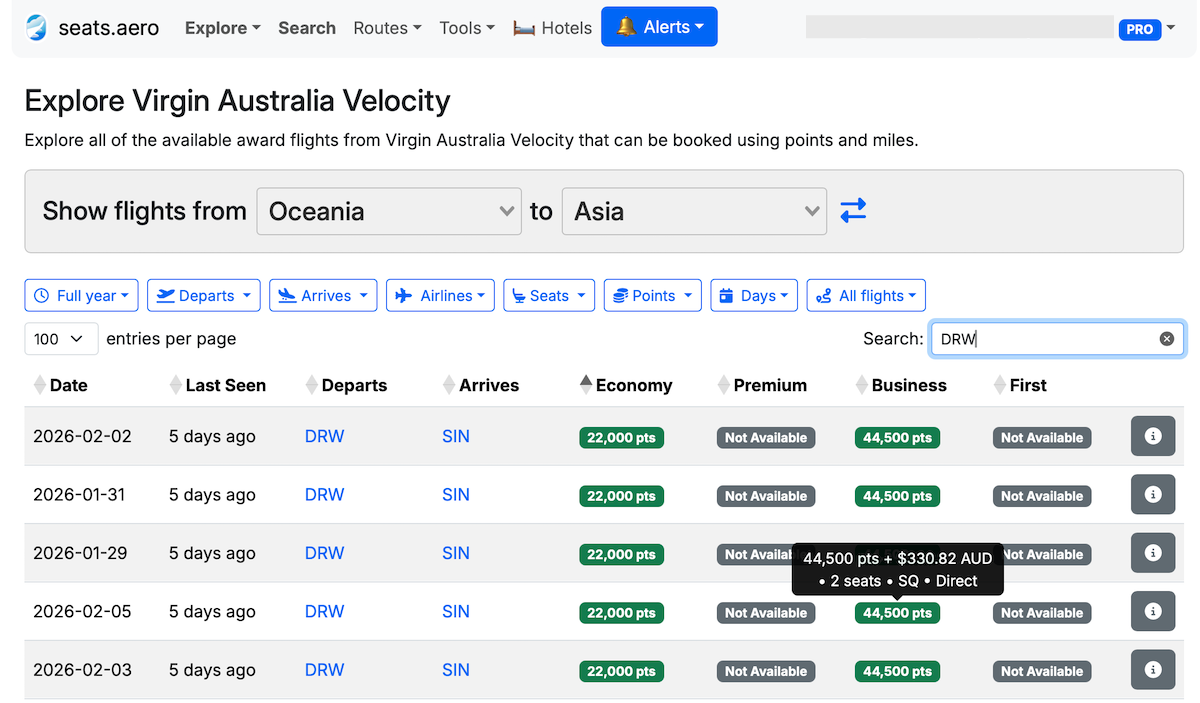
If you’re looking for award availability to or from a specific airport, such as Darwin, simply type the IATA code for that airport into the search box. In this instance, typing “DRW” (for Darwin) on a Virgin Australia Velocity search for flights from Oceania to Asia brings up options from Darwin to Singapore on Singapore Airlines.
When viewing Velocity availability, you can even see the number of seats available in each cabin class by hovering over the green (or blue) box.
Search feature
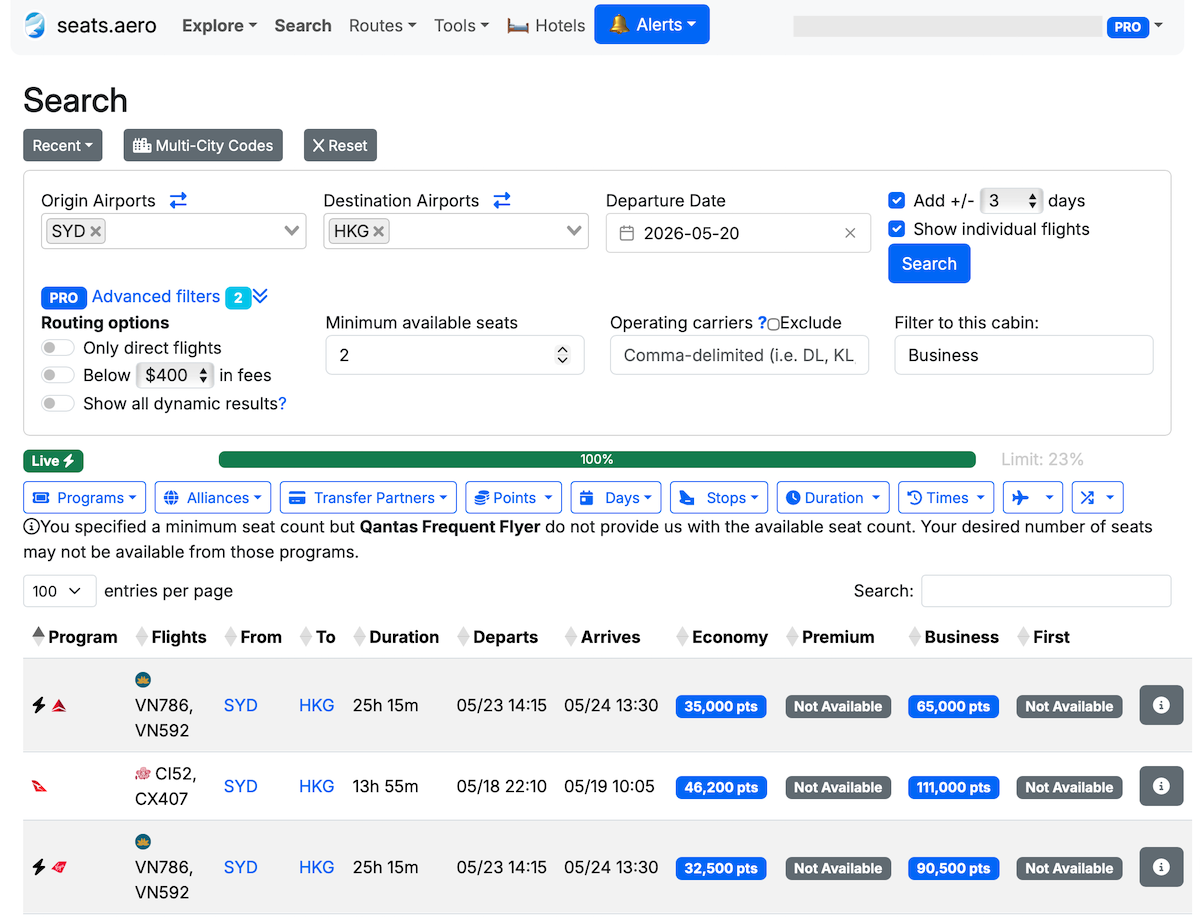
If you have points available with multiple different airlines – or a flexible credit card rewards program – you can also use the “Search” feature to look for flights between specific airports using any of the supported frequent flyer programs.
There are additional filters available to include or exclude results on different programs or alliances. There’s even an option to show only results with programs that you can transfer Australian Amex Membership Rewards points to.
Creating alerts
Seats.aero lets you create alerts for award availability on specific routes and cabin classes with any of the supported programs. You’ll then receive an email or SMS if Seats.aero identifies any award availability that matches your search criteria in the future.
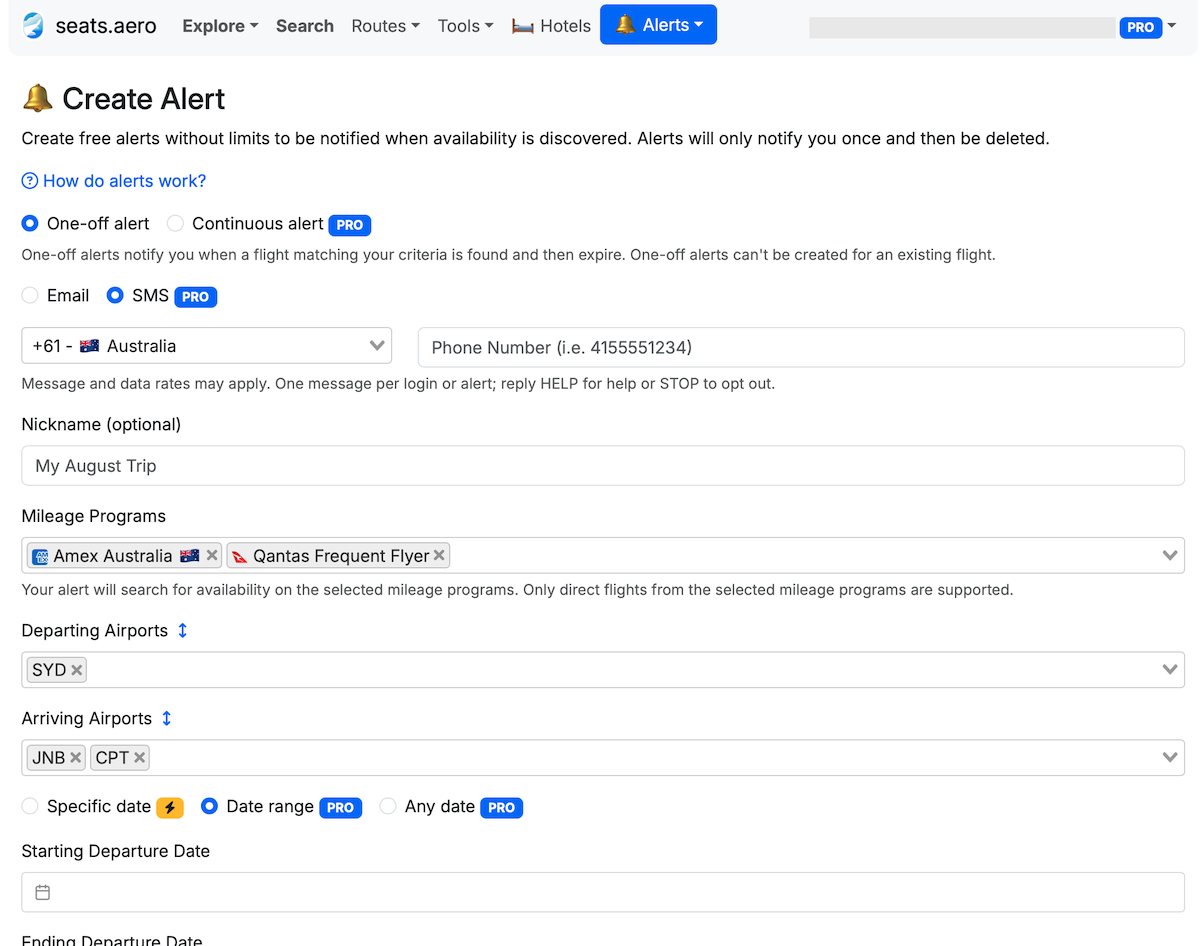
ExpertFlyer also has an award alert feature, but that tool no longer supports award availability for many airlines. And with ExpertFlyer, you can only set this up for one individual flight and cabin class at a time.
Other features
Recently, seats.aero has been adding lots of other useful features that you’d previously need an ExpertFlyer subscription to access. For example, you can now view Timatic visa & entry requirements, and access GDS Tools such as:
- Fares Viewer (view fare rules & pricing)
- Fare Class Viewer (see which fare classes are available for sale on a given flight)
- Seat Map Viewer (see which seats are available, occupied or blocked on a specific flight in real time)
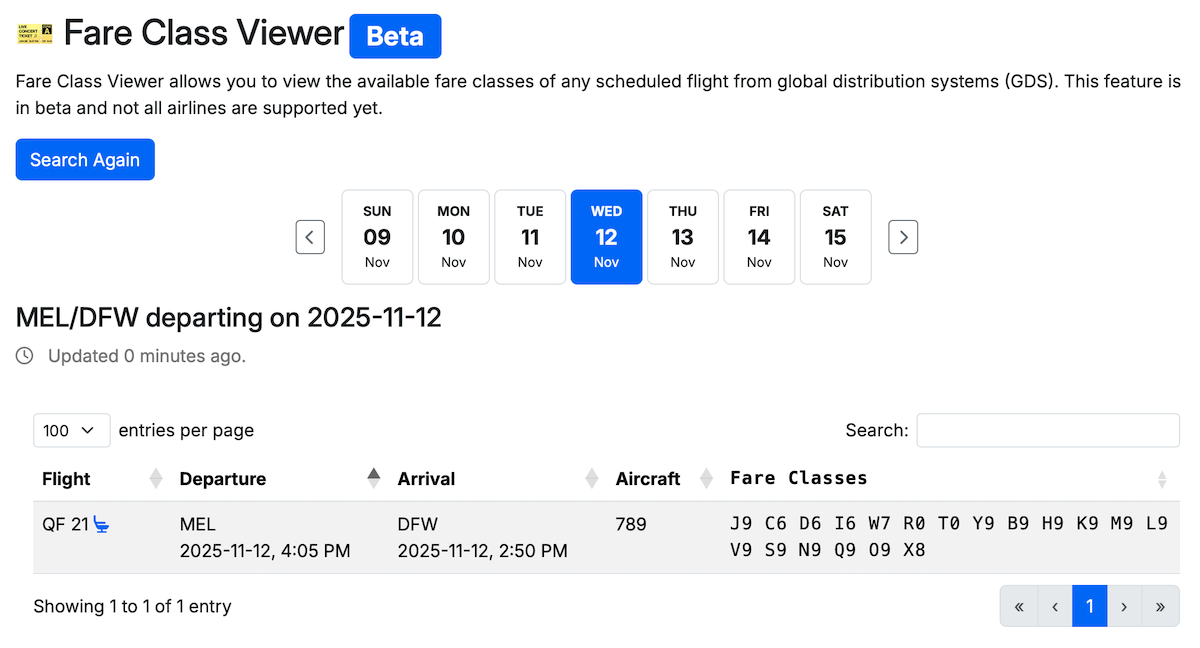
Other Seats.aero features include a Lufthansa First Class award finder, JAL First Class Finder and a tool specifically for finding Qatar Airways Qsuite redemptions.

Once you’ve found a flight you’re happy with, you can go directly to your airline’s own website to complete the booking.
Some limitations to keep in mind
Although seats.aero works pretty well, there are some limitations.
One slight problem is that the results are cached. By regularly checking for availability in the background, seats.aero is able to show the results of any search very quickly. But you’ll generally be looking at information that could be hours or days old. The good news is that it does actually tell you when the seats shown were last checked. If you click on the “i” box beside any of the results, it will do another verification check on the spot to make sure the seats are still there in real-time.
Another limitation is that seats.aero doesn’t (yet) cover all routes in the Explore mode. For example, it doesn’t cover most Qantas domestic routes other than a few of the most popular ones. It also doesn’t cover every partner airline route, so it will potentially miss some options that do actually exist. That said, Pro members can request new routes to be added – and I’ve found Seats.aero to be very responsive in adding suggested routes.
I have seen instances where the Explore mode didn’t show all the available seats. For example, I recently found that I could find more Velocity Business reward seats on the Singapore-Perth route using the Search feature than what the Explore tool was showing.
Finally, seats.aero won’t show award seats on airlines that don’t appear on your frequent flyer program’s own website. For example, reward seats on Virgin Atlantic, South African Airways and Hong Kong Airlines don’t appear on the Virgin Australia website. So you’d still need to use other methods to find seats on those airlines before calling Velocity Frequent Flyer to book.
Availability on specific flights can differ according to your status & frequent flyer program
If using the Qantas Frequent Flyer search function, seats.aero won’t necessarily take into account your Qantas Frequent Flyer status. If you have Qantas Silver, Gold, Platinum or Platinum One status, you may have access to increased award availability that you would be able to see when searching on the Qantas website. But those extra seats wouldn’t appear on seats.aero (nor on most other third-party tools, other than KVS Tool which searches using your personal account details).
You should also keep in mind that award availability can differ depending on which frequent flyer program you’re using to book. For example, Singapore Airlines is a Star Alliance member and partners with Virgin Australia. But the availability of Singapore Airlines award seats could be different for members of KrisFlyer, Aeroplan, Velocity, Avianca LifeMiles and United MileagePlus.
Nonetheless, this is a very useful tool for quickly getting an overview of award availability. It can identify flights you may not have otherwise found (or thought to look for)!
Seats.aero membership options
Anyone can use seats.aero for free, without creating an account. This gives you access to information about award seats on flights within the next 60 days. You’ll also be able to set up a limited number of email alerts.
If you choose to purchase a Pro account, you can get access to more features. These include:
- View award availability up to a year in advance
- Access advanced filters including direct flights and minimum number of seats (this works with most but not all programs)
- Create unlimited award seat alerts
- The option to receive SMS notifications, rather than just emails
- Use GDS Tools like Seat Maps and the Fare Class Viewer
- Remove advertisements
A Pro plan costs USD9.99 (~AU$15) per month or USD99.99 (~AU$150) with an annual subscription. The annual subscription works out to be around 16% cheaper.
See the Seats.aero website for more information or to register.
AFF Member discount
If you’re an AFF Gold or Platinum member, you can access an exclusive discount on a new seats.aero annual Pro subscription!
AFF Platinum members get 25% off, while AFF Gold members get a 10% discount. This is a saving of USD25 (~AU$38) or USD10 (~AU$15) off the cost of an already-discounted annual subscription.
You can check out AFF’s membership options here.
If you’re already an AFF Gold or Platinum member, access your seats.aero discount via the Member Benefits page.
Ensure you’re logged in to your AFF account to see your available membership benefits and access your discount. Scroll down to “seats.aero” and select the “Get Discount” button, as shown below:
We’ll then send a unique discount code to your email address.
Disclosure: As seats.aero is an affiliate partner, Australian Frequent Flyer may receive a commission if you sign up through links on this page. Thank you for your support.
Related Articles
-
 11 December, 2022Travel Tools & Technology
 -
 19 June, 2025Points Inspiration, Qantas
 -
 16 March, 2025Qantas
Community Comments
Loading new replies...
Join the full discussion at the Australian Frequent Flyer →