




Alternative to TripIt = TripWaffle

With five different email accounts/organisations to manage, how is not taking the laptop an option? Sorry off-topic to Tripwaffle.

Most is voluntary (some parttime) nowadays and respective people advised in advance “when I’m away, I’m away” and I only deal with urgent things via the phone/whatsapp/brief email, the rest can wait until I get back.

Taking or not taking the laptop definitely is an option, and my choice is not to take 😅

I have no delusions about my importance. If I get hit by a bus tomorrow they will find a replacement pretty quickly.
 
Last edited:
While adding to a couple of current trip plans, it occurred to me I dont think I've ever seen an app that allows the user to clearly see the difference between booked its vs planned items. For example if I add that I want to take a train or see a show, but some indicator that I still need to actually book it. I like to add everything to get a sense of the plan, but the risk is I forgot someone on the list isnt actually booked. Just a thought!
 
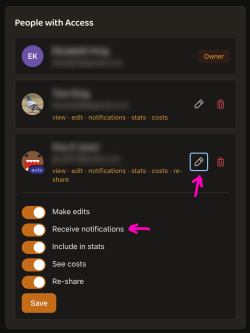
Is this the setting?

I'm also getting notifications (push) on my phone for a trip I'm not on. Eg, boarding gate info etc. I think it would make sense to have a separate setting to disable those notifications as well as the pre-trip email if I'm not travelling.
At present you'd have to ask the person who shared with you to turn off notifications permissions:
Screenshot 2026-07-06 at 6.26.50 am.png
Let me know if this is onerous though, and I can spend some time coming up with a self-serve approach.
 
While adding to a couple of current trip plans, it occurred to me I dont think I've ever seen an app that allows the user to clearly see the difference between booked its vs planned items. For example if I add that I want to take a train or see a show, but some indicator that I still need to actually book it. I like to add everything to get a sense of the plan, but the risk is I forgot someone on the list isnt actually booked. Just a thought!
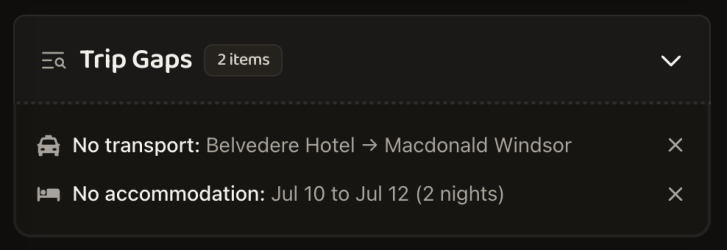
It's an interesting train of thought. At present we show auto "Trip Gaps" below upcoming trip timelines:

Screenshot 2026-07-06 at 6.33.34 am.png

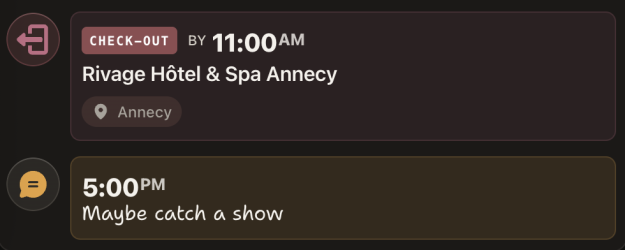
If it was me, I'd probably use the "Other > Note" event type as a placeholder for this sort of thing e.g.

Screenshot 2026-07-06 at 6.34.50 am.png
 
Elevate your business spending to first-class rewards! Sign up today with code AFF10 and process over $10,000 in business expenses within your first 30 days to unlock 10,000 Bonus PayRewards Points.
Join 30,000+ savvy business owners who:

✅ Pay suppliers who don’t accept Amex
✅ Max out credit card rewards—even on government payments
✅ Earn & transfer PayRewards Points to 10+ airline & hotel partners

Start earning today!
- Pay suppliers who don’t take Amex
- Max out credit card rewards—even on government payments
- Earn & Transfer PayRewards Points to 8+ top airline & hotel partners

AFF Supporters can remove this and all advertisements

At present you'd have to ask the person who shared with you to turn off notifications permissions:
View attachment 513434
Let me know if this is onerous though, and I can spend some time coming up with a self-serve approach.
That's going to be challenging and annoying relying on the person who owns the trip.

Could I suggest that either there is an option on the watched side or alternatively on a per trip basis?
 
At present you'd have to ask the person who shared with you to turn off notifications permissions:
View attachment 513434
Let me know if this is onerous though, and I can spend some time coming up with a self-serve approach.

There is one person I have shared a trip with that is not travelling and I had left on 'Receive notifications' in that invitation, but now realise that it could be a nuisance for a non fellow-traveller.

I can't edit that invitation to turn off notifications. The only way to do that seems to be to delete that invitation and re-invite. Is that the case?
 

Become an AFF member!

Join Australian Frequent Flyer (AFF) for free and unlock insider tips, exclusive deals, and global meetups with 65,000+ frequent flyers.

AFF members can also access our Frequent Flyer Training courses, and upgrade to Fast-track your way to expert traveller status and unlock even more exclusive discounts!

AFF forum abbreviations

Wondering about Y, J or any of the other abbreviations used on our forum?

Check out our guide to common AFF acronyms & abbreviations.
Back
Top