



Alternative to TripIt = TripWaffle

With five different email accounts/organisations to manage, how is not taking the laptop an option? Sorry off-topic to Tripwaffle.

Most is voluntary (some parttime) nowadays and respective people advised in advance “when I’m away, I’m away” and I only deal with urgent things via the phone/whatsapp/brief email, the rest can wait until I get back.

Taking or not taking the laptop definitely is an option, and my choice is not to take 😅

I have no delusions about my importance. If I get hit by a bus tomorrow they will find a replacement pretty quickly.
 
Last edited:
While adding to a couple of current trip plans, it occurred to me I dont think I've ever seen an app that allows the user to clearly see the difference between booked its vs planned items. For example if I add that I want to take a train or see a show, but some indicator that I still need to actually book it. I like to add everything to get a sense of the plan, but the risk is I forgot someone on the list isnt actually booked. Just a thought!
 
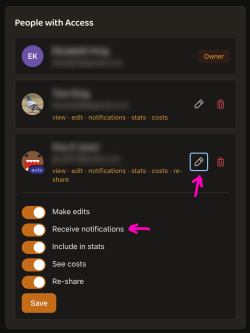
Is this the setting?

I'm also getting notifications (push) on my phone for a trip I'm not on. Eg, boarding gate info etc. I think it would make sense to have a separate setting to disable those notifications as well as the pre-trip email if I'm not travelling.
At present you'd have to ask the person who shared with you to turn off notifications permissions:
Screenshot 2026-07-06 at 6.26.50 am.png
Let me know if this is onerous though, and I can spend some time coming up with a self-serve approach.
 
While adding to a couple of current trip plans, it occurred to me I dont think I've ever seen an app that allows the user to clearly see the difference between booked its vs planned items. For example if I add that I want to take a train or see a show, but some indicator that I still need to actually book it. I like to add everything to get a sense of the plan, but the risk is I forgot someone on the list isnt actually booked. Just a thought!
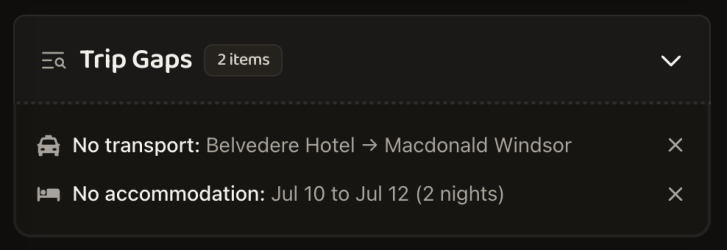
It's an interesting train of thought. At present we show auto "Trip Gaps" below upcoming trip timelines:

Screenshot 2026-07-06 at 6.33.34 am.png

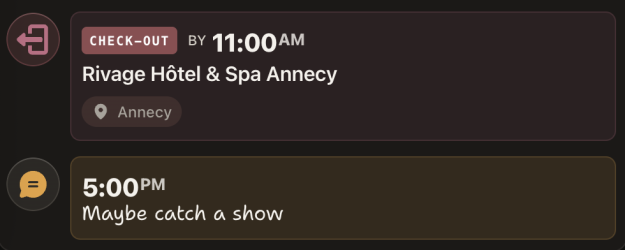
If it was me, I'd probably use the "Other > Note" event type as a placeholder for this sort of thing e.g.

Screenshot 2026-07-06 at 6.34.50 am.png
 
At present you'd have to ask the person who shared with you to turn off notifications permissions:
View attachment 513434
Let me know if this is onerous though, and I can spend some time coming up with a self-serve approach.
That's going to be challenging and annoying relying on the person who owns the trip.

Could I suggest that either there is an option on the watched side or alternatively on a per trip basis?
 
At present you'd have to ask the person who shared with you to turn off notifications permissions:
View attachment 513434
Let me know if this is onerous though, and I can spend some time coming up with a self-serve approach.

There is one person I have shared a trip with that is not travelling and I had left on 'Receive notifications' in that invitation, but now realise that it could be a nuisance for a non fellow-traveller.

I can't edit that invitation to turn off notifications. The only way to do that seems to be to delete that invitation and re-invite. Is that the case?
 
While we are talking about per person, what about the ability to "tickbox" and "others" section for who an event/entry is for, based off who the trip is shared with, instead of a line by line attendees section?
i.e. A321 and Mrs A321 are attending this dinner, but Mr XYZ and Mrs XYZ are not.
 
Is there any way of changing the comic sans type font in the "Notes" section of a booking? It looks so out of place.
 
If it was me, I'd probably use the "Other > Note" event type as a placeholder for this sort of thing e.g.

That works for me. Up till now, for something I need to do, but hadn't yet (ie book a train or hotel), I'd create that event and preface the name with NEED TO BOOK. Creating the note does the same thing and is quicker.
 
There is one person I have shared a trip with that is not travelling and I had left on 'Receive notifications' in that invitation, but now realise that it could be a nuisance for a non fellow-traveller.

I can't edit that invitation to turn off notifications. The only way to do that seems to be to delete that invitation and re-invite. Is that the case?
okey now you can disable notifications for yourself via the share trip page...

share.png
 
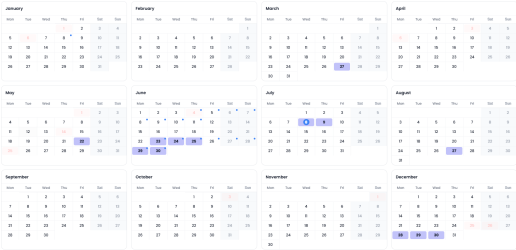
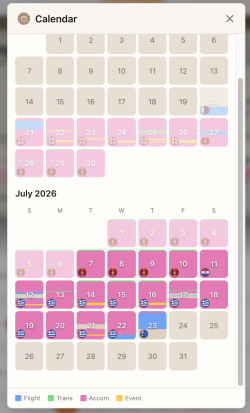
@tripwaffle is it possible to include a calendar view option from the main dashboard that would let you see the "big picture at a glance" with busy days highlighted (and maybe show actual trip name on mouse hover over the date)? Selectable views would be great too (something like Google calendar - Year/ Month/ Week/ Schedule etc ) plus a Print function 🙏
1783450085970.png
 
@tripwaffle is it possible to include a calendar view option from the main dashboard that would let you see the "big picture at a glance" with busy days highlighted (and maybe show actual trip name on mouse hover over the date)? Selectable views would be great too (something like Google calendar - Year/ Month/ Week/ Schedule etc ) plus a Print function 🙏
Hi @Lat34

We've got a bit of a calendar view going on by tapping this button...

Screenshot 2026-07-07 at 9.26.21 pm.png

Results in...

Screenshot 2026-07-07 at 9.26.35 pm.png

There's also a printable calendar view (tap 'print' at the bottom of the trip).

Please shout though if these aren't meeting your needs in any way.
 
Hi @Lat34

We've got a bit of a calendar view going on by tapping this button...

View attachment 513828

Results in...

View attachment 513829

There's also a printable calendar view (tap 'print' at the bottom of the trip).

Please shout though if these aren't meeting your needs in any way.
thanks TW - I knew about the calendar ribbon per trip and the printable trip calendar. What I would like is a full "year at a glance" overview that looks a little like your June/ July calendar sample above so that you can see which days have an entry of some kind each month (edit: from trip data already entered that matches the year selected). It would only be useful viewed on a desktop I think - way too small for a phone screen. Bonus if the annual view could be printed too!

Think I will activate calendar feed and play around with Outlook and Google calendars to see if I can get something approximate.
 
Last edited:
Also, while I'm on a roll entering upcoming data for various trips, it might be useful to be able to create and assign an optional trip code/ keyword to any trip.
User could then filter & review similar trips in a general or specific timeframe as required (don't think this can happen now??).

There is the obvious work/personal travel divide for starters.

Plus some simple but practical examples:
- one friend has been on several local plus o/s trips with "dog walking" friends - code DWG (eg 3/4 alphanumeric code that makes sense)
- later this year same friend plus a couple of other "SC keepers" have organised a weekend away - code SKP
- obvious FAM / WRK trips and so on...

Just a suggestion...
 
Elevate your business spending to first-class rewards! Sign up today with code AFF10 and process over $10,000 in business expenses within your first 30 days to unlock 10,000 Bonus PayRewards Points.
Join 30,000+ savvy business owners who:

✅ Pay suppliers who don’t accept Amex
✅ Max out credit card rewards—even on government payments
✅ Earn & transfer PayRewards Points to 10+ airline & hotel partners

Start earning today!
- Pay suppliers who don’t take Amex
- Max out credit card rewards—even on government payments
- Earn & Transfer PayRewards Points to 8+ top airline & hotel partners

AFF Supporters can remove this and all advertisements

Also, while I'm on a roll entering upcoming data for various trips, it might be useful to be able to create and assign an optional trip code/ keyword to any trip.
User could then filter & review similar trips in a general or specific timeframe as required (don't think this can happen now??).

There is the obvious work/personal travel divide for starters.

Plus some simple but practical examples:
- one friend has been on several local plus o/s trips with "dog walking" friends - code DWG (eg 3/4 alphanumeric code that makes sense)
- later this year same friend plus a couple of other "SC keepers" have organised a weekend away - code SKP
- obvious FAM / WRK trips and so on...

Just a suggestion...
I get you; and it's kinda possible now if you edit the trip title to include your code, and then a "search" from the dashboard should pick up those trips.

Also I missed your original intent with the yearly calendar view apologies, but am looking into something along these lines now.
 

Become an AFF member!

Join Australian Frequent Flyer (AFF) for free and unlock insider tips, exclusive deals, and global meetups with 65,000+ frequent flyers.

AFF members can also access our Frequent Flyer Training courses, and upgrade to Fast-track your way to expert traveller status and unlock even more exclusive discounts!

AFF forum abbreviations

Wondering about Y, J or any of the other abbreviations used on our forum?

Check out our guide to common AFF acronyms & abbreviations.
Back
Top