





You are using an out of date browser. It may not display this or other websites correctly.
You should upgrade or use an alternative browser.
You should upgrade or use an alternative browser.
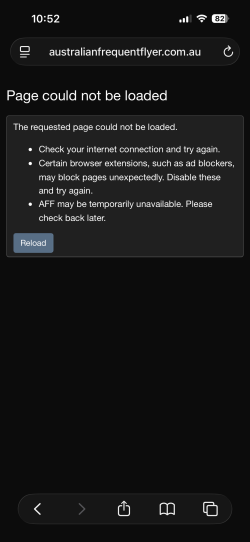
Persistent "Page could not be loaded" error
- Thread starter DejaBrew
- Start date

Cruiser Elite
Enthusiast
- Joined
- Oct 31, 2010
- Posts
- 14,945
Definitely getting worse with iOS
pagingjoan
Established Member
- Joined
- Mar 30, 2009
- Posts
- 2,260
The iPad and phone are just as bad for me. Maybe worse.Maybe the latest update to iOS or maybe AFF has fixed something, but the need to refresh has reduced massively in the last 24hrs or so.
Not totally gone but a huge improvement to previous experience for the last few weeks.

- Joined
- Jan 26, 2011
- Posts
- 31,010
- Qantas
- Platinum
- Virgin
- Red
Yep. Worse for me too. I thought they'd given up in fact. Also I see there is a change when trying to see what a quoted post was. Instead of going to a URL not found, it goes to a search function page. Like, as if I can remember whose quoted post it was anyway. Not a solution.The iPad and phone are just as bad for me. Maybe worse.

Read our AFF credit card guides and start earning more points now.
AFF Supporters can remove this and all advertisements


SYD
Enthusiast
- Joined
- Oct 5, 2009
- Posts
- 16,310
- Qantas
- Platinum
- Virgin
- Red
- Oneworld
- Emerald
- Star Alliance
- Gold
Could be iOS / Safari. Not the other two - I’m still seeing it with no VPN / ad blocker.I really do think the issue is apple and/or vpn and/or ad blocker related (possibly a combo). Ive still never seen any of these issues on windows or android.
I haven’t tried another browser yet.

- Joined
- Jun 1, 2014
- Posts
- 5,969
A month on and it seems to be getting worse.
Certainly not better.
Certainly not better.

Had it twice on loading this page; ironically. But never had it anywhere else, WP for me is fine and has been forever. Odd!Got a similar issue also accessing Whirlpool so it’s not unique to AFF (also iPad/Safari).
WHad it twice on loading this page; ironically. But never had it anywhere else, WP for me is fine and has been forever. Odd!
Had it twice on loading this page; ironically. But never had it anywhere else, WP for me is fine and has been forever. Odd!
Very odd - I thought it was an IPV6 thing but not sure.

oz_mark
Enthusiast
- Joined
- Jun 30, 2002
- Posts
- 22,454
The indications I have seen is that it is an issue between the ios/safari and cloudfronts http/3 implementations.W
Very odd - I thought it was an IPV6 thing but not sure.

- Joined
- Jul 8, 2007
- Posts
- 3,426
- Qantas
- Platinum 1
- Virgin
- Red
- Oneworld
- Emerald
SYD
Enthusiast
- Joined
- Oct 5, 2009
- Posts
- 16,310
- Qantas
- Platinum
- Virgin
- Red
- Oneworld
- Emerald
- Star Alliance
- Gold
I think it’s a Safari thing.It may be helpful for @admin if those of us having issues indicate device, OS version, browser, and whether or not VPN or Ad Blockers are in use.
In my case…
Device: iPhone 16
OS: iOS 26.6 (Beta)
Browser: Safari
VPN: No
Ad Blocker: No
No errors observed whilst navigating AFF today.
Seems to working fine with Chrome and Firefox but flaky with safari.
I have a “Favourites” bookmark for AFF in Safari. When I click on that 50% of the time I get the can’t load page error…
- Joined
- Jul 8, 2007
- Posts
- 3,426
- Qantas
- Platinum 1
- Virgin
- Red
- Oneworld
- Emerald
I suspect similar as well, but as someone who has experienced the issue (albeit rarely) on a Windows 11 machine with Chrome, I think the root cause may be slightly more nuanced. Also, different devices and OS versions would point to different Safari versions which may or may not make a difference. Likely useful to understand as well if anything else (e.g. VPN or ad blockers) could be muddying the waters.I think it’s a Safari thing.
Seems to working fine with Chrome and Firefox but flaky with safari.
SYD
Enthusiast
- Joined
- Oct 5, 2009
- Posts
- 16,310
- Qantas
- Platinum
- Virgin
- Red
- Oneworld
- Emerald
- Star Alliance
- Gold
Yep. As I mentioned earlier I’m not using ad blockers and I’m seeing with VPN off on both my iPhone iOS 26.5 but my iPad is quite old and locked to an old iOS - but still seeing it with Safari.I suspect similar as well, but as someone who has experienced the issue (albeit rarely) on a Windows 11 machine with Chrome, I think the root cause may be slightly more nuanced. Also, different devices and OS versions would point to different Safari versions which may or may not make a difference. Likely useful to understand as well if anything else (e.g. VPN or ad blockers) could be muddying the waters.
I don’t recall seeing on my Windows PC.
- Joined
- Apr 6, 2018
- Posts
- 2,987
I use Firefox and i-phone and get it every Second login or worse. No VPNI think it’s a Safari thing.
Seems to working fine with Chrome and Firefox but flaky with safari.
I have a “Favourites” bookmark for AFF in Safari. When I click on that 50% of the time I get the can’t load page error…
Has the issue been logged by help-desk?!
- Joined
- Jul 8, 2007
- Posts
- 3,426
- Qantas
- Platinum 1
- Virgin
- Red
- Oneworld
- Emerald
Have now noted a couple of page load errors since posting this, but FWIW, it is notably reduced and resolves after one refresh.In my case…
Device: iPhone 16
OS: iOS 26.6 (Beta)
Browser: Safari
VPN: No
Ad Blocker: No
No errors observed whilst navigating AFF today.
- Joined
- Jul 8, 2007
- Posts
- 3,426
- Qantas
- Platinum 1
- Virgin
- Red
- Oneworld
- Emerald
Yes it has -:Has the issue been logged by help-desk?!

Thanks all for reporting - will pass on to our team and update 
Please report any further issues in this thread, as it helps us reproduce and fix as best we can!
Yep, this has been passed on a few weeks ago, although a fix is seemingly more difficult than expected.Yes the function to see what a quoted post is, hasn't been fixed either.
Please report any further issues in this thread, as it helps us reproduce and fix as best we can!



Become an AFF member!
Join Australian Frequent Flyer (AFF) for free and unlock insider tips, exclusive deals, and global meetups with 65,000+ frequent flyers.AFF members can also access our Frequent Flyer Training courses, and upgrade to Fast-track your way to expert traveller status and unlock even more exclusive discounts!
AFF forum abbreviations
Wondering about Y, J or any of the other abbreviations used on our forum?Check out our guide to common AFF acronyms & abbreviations.


Currently Active Users
Total: 3,919 (members: 13, guests: 3,906)