Alternative to TripIt = TripWaffle

@tripwaffle , wonder what you think of this idea. Along the top of each day (ie in line with day, date, flags etc) you enable a drop-down 'Notes' box, where random notes relating the day can be quickly entered - number of steps taken; withdrew US$500 with Wise card; bought E75.27 fuel @ E1.95/l ; security took >1 hour at JFK; and so on.

Would be a bit more clutter, so maybe have option to turn off 'Daily notes'

 
@tripwaffle , wonder what you think of this idea. Along the top of each day (ie in line with day, date, flags etc) you enable a drop-down 'Notes' box, where random notes relating the day can be quickly entered - number of steps taken; withdrew US$500 with Wise card; bought E75.27 fuel @ E1.95/l ; security took >1 hour at JFK; and so on.

Would be a bit more clutter, so maybe have option to turn off 'Daily notes'
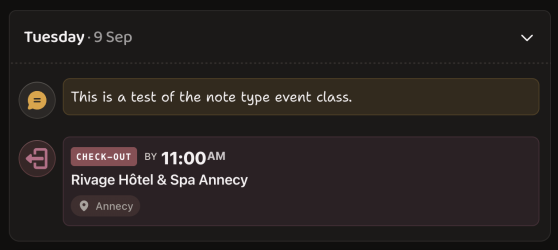
Interesting idea. We recently added "Other > Note" as an event type...

Screenshot 2026-06-18 at 8.25.58 am.png

Which may work for your scenario, or possibly too many clicks to get to? Have a play and let me know your thoughts.
 
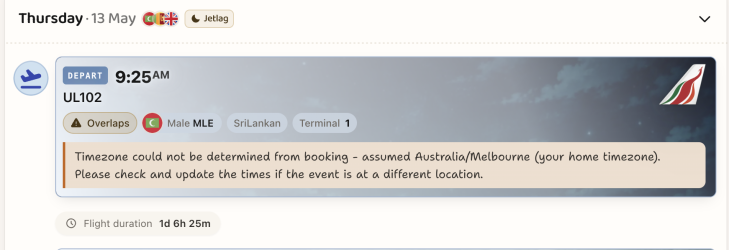
Could I please get an answer how to manually update time zone as it's currentlty telling me my flight duration is around 30 hours.
Looks like you beat me to it- setting both airports and times resolved this.

Investigating further... that multi-leg itinerary import from email identified a bad IANA timezone for that particular flight. Additional checks have been added to catch/correct this in the future.

Thanks for the report.
 
I had a single booking with 12 segments, 6 in February/March and 6 In August/September. It had been set up in tripwaffle splitting into two separate trips with other nested bookings.

The first part has been travelled.

After received an airline schedule change for August flights a new ticket was created. The confirmation e-ticket contained all 12 segments, including those flown.

I sent this off to tripwaffle and it happily modified the Feb/Mar trip, adding the August segments makings 200 day trip. The existing Aug/Sep trip in my account (where the schedule changes were) was untouched.

I now have a mess to clean up ...

Is there a setting in Trip Waffle to not try to import emails into existing / new trips but have them all sent to an unassociated area when I can manually drag and drop items into their relevant trip.

I use such a setting with Tripit.
 
I had a single booking with 12 segments, 6 in February/March and 6 In August/September. It had been set up in tripwaffle splitting into two separate trips with other nested bookings.

The first part has been travelled.

After received an airline schedule change for August flights a new ticket was created. The confirmation e-ticket contained all 12 segments, including those flown.

I sent this off to tripwaffle and it happily modified the Feb/Mar trip, adding the August segments makings 200 day trip. The existing Aug/Sep trip in my account (where the schedule changes were) was untouched.

I now have a mess to clean up ...

Is there a setting in Trip Waffle to not try to import emails into existing / new trips but have them all sent to an unassociated area when I can manually drag and drop items into their relevant trip.

I use such a setting with Tripit.
I'll look into this further, but in the meantime have you found the "reorganize" tool (bottom of the dashboard)? Makes it very quick to drag and drop events between trips.
 
Elevate your business spending to first-class rewards! Sign up today with code AFF10 and process over $10,000 in business expenses within your first 30 days to unlock 10,000 Bonus PayRewards Points.
Join 30,000+ savvy business owners who:

✅ Pay suppliers who don’t accept Amex
✅ Max out credit card rewards—even on government payments
✅ Earn & transfer PayRewards Points to 10+ airline & hotel partners

Start earning today!
- Pay suppliers who don’t take Amex
- Max out credit card rewards—even on government payments
- Earn & Transfer PayRewards Points to 8+ top airline & hotel partners

AFF Supporters can remove this and all advertisements

TW has dropped today’s return from KTA-PER but retained rental car and hotel bookings. It still shows last Thursday’s QF PER-KTA record - corrected to late departure time and actual arrival time.

Flights were all on the same booking.
 
TW has dropped today’s return from KTA-PER but retained rental car and hotel bookings. It still shows last Thursday’s QF PER-KTA record - corrected to late departure time and actual arrival time.

Flights were all on the same booking.
That was an under-extraction on our end, apologies. Your missing leg has been restored and we've hardened the process against this scenario happening again. Thanks for reporting.
 
Enjoying the layout and customisation, though still need to run a spreadsheet to track total trip expenses. Will run both for my next trip and see what I end up referring to the most. Am currently a Wonderlog subscriber but it still hasn't quite scratched whatever travel planning itch I have, one day excel will be truly superseded!
 
Enjoying the layout and customisation, though still need to run a spreadsheet to track total trip expenses. Will run both for my next trip and see what I end up referring to the most. Am currently a Wonderlog subscriber but it still hasn't quite scratched whatever travel planning itch I have, one day excel will be truly superseded!

A compatriot! I plan all my sojourns on excel ❤️ as well but once bookings are made they are loaded into Tripit (now TripWaffle). In the planning phase I try and reduce costs where I can, changing a day or tour here and there to pick up cheaper flight or accommodation discounts etc. I deliberately don’t add up all the costs at the end, I don’t want trip regret and just enjoy the holiday.

Once the itinerary is settled and bookings have been made I find an App is easier to quickly refer to specific details, is updated in near real time with transport changes and don’t have to carry paper.

Long since stopped taking a laptop everywhere with me.
 
Morning @tripwaffle

Apologies if this has been mentioned before. I use Tripwaffle on iOS & Android.

On the iPhone I have the dark/light setting to match the system setting. But the Home Screen widget remain in dark mode 24/7. I have turned the app setting to ‘Light’ to try and force the widget to light but it remains in dark mode.

Any chance you could have a look at that in your busy schedule? It’s no stress, just a bit incongruous when the other Home Screen widgets are light.
 

Become an AFF member!

Join Australian Frequent Flyer (AFF) for free and unlock insider tips, exclusive deals, and global meetups with 65,000+ frequent flyers.

AFF members can also access our Frequent Flyer Training courses, and upgrade to Fast-track your way to expert traveller status and unlock even more exclusive discounts!

AFF forum abbreviations

Wondering about Y, J or any of the other abbreviations used on our forum?

Check out our guide to common AFF acronyms & abbreviations.
Back
Top