Alternative to TripIt = TripWaffle

Thanks for finding this- it should be fixed now (both for your specific flight, and editing flight numbers going forward).
Root of the problem: the original tracked flight data was persisting in the background. It is now properly cleared and repopulated.
Looking all good now. Love your work! 👍
 
I have been navigating and planning parking in various towns on my driving trip through France.

I have been putting it into ‘other activity’ not realising it was one of the options in transport.

Now its in its proper place, I want to delete the 'pickup' time (that is optional to enter, but I entered it). How to do? 'Reset' when editing that time in the event does nothing.

IMG_9380.jpeg
 
I have been navigating and planning parking in various towns on my driving trip through France.

I have been putting it into ‘other activity’ not realising it was one of the options in transport.

Now its in its proper place, I want to delete the 'pickup' time (that is optional to enter, but I entered it). How to do? 'Reset' when editing that time in the event does nothing.
When editing the event, you need to delete/clear the end date/time fields. On desktop I do that via the backspace button, on Android the date picker has a 'clear' button in the lower-left. Let me know if that doesnt work for you though.
 
When editing the event, you need to delete/clear the end date/time fields. On desktop I do that via the backspace button, on Android the date picker has a 'clear' button in the lower-left. Let me know if that doesnt work for you though.

Ah, yes, works on my laptop. I was trying on my iPhone. There, it just brings up the calendar date-picker. There is a 'reset' button, but tapping it does nothing.
 
One suggestion - I just had a notification pop up telling me to check the expiry of my passport. How about a way to enter my passport's expiry date, and then use that to check whether I'll be permitted entry. Likewise for things like ESTA, ETAs etc. I realise you may not want to be giving too much advice on rules for entry, but even just a way to see that an ETA is expiring would be useful.
 
Great tool.

Minor point: TW didn't pick up a down-gauge from an A330 to a maggot PER-SYD - unless I didn't allow enough time for that to happen before manually changing it.

Edit: I see that live tracking starts about 48h before a flight. I guess it would pick up a down-gauge then.
 
Last edited:
Read our AFF credit card guides and start earning more points now.

AFF Supporters can remove this and all advertisements

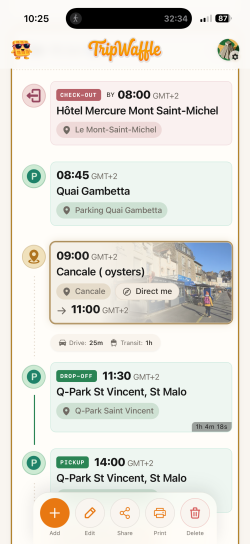
Two parking situations. One after Hotel check out with just a start time entered as it was open ended parking and one after a location visit with a begin and end time entered as it was prepaid parking.

The second one has calculated driving time from the location to the parking spot, but the first one hasn’t.

Certainly not a biggie for me, but can you think of a reason for this inconsistency? All four entries had locations entered to the street level.

IMG_9493.png
 
One suggestion - I just had a notification pop up telling me to check the expiry of my passport. How about a way to enter my passport's expiry date, and then use that to check whether I'll be permitted entry. Likewise for things like ESTA, ETAs etc. I realise you may not want to be giving too much advice on rules for entry, but even just a way to see that an ETA is expiring would be useful.
It's a solid idea, and I think at some point we'll consolidate Passports+ETAs into a single place and track expiries. The fiddly thing is dealing with multiple travel partners / shares and how that all works. We'll get there though.
 
Great tool.

Minor point: TW didn't pick up a down-gauge from an A330 to a maggot PER-SYD - unless I didn't allow enough time for that to happen before manually changing it.

Edit: I see that live tracking starts about 48h before a flight. I guess it would pick up a down-gauge then.
Thank you John.
For a flight that's still a way out, the aircraft type you see is our best guess (from what usually flies that route). As the flight get closer (esp. within 48h) we start actively checking the scheduling data and replace the estimate with the real aircraft, if available.
Curious what source you used to spot the downgauged flight beforehand?
 
Two parking situations. One after Hotel check out with just a start time entered as it was open ended parking and one after a location visit with a begin and end time entered as it was prepaid parking.

The second one has calculated driving time from the location to the parking spot, but the first one hasn’t.

Certainly not a biggie for me, but can you think of a reason for this inconsistency? All four entries had locations entered to the street level.
An open-ended parking entry with only a start time was treated as a single point in time, and our logic was skipping the drive estimate for those.
Not quite right logic on our end, so its just been changed so that the "drive to the parking spot" time now shows for open-ended parking too. Both your entries should now be consistent.

Thanks for prompting an upgrade, and I'll take some of those oysters too please!
 
Thank you John.
For a flight that's still a way out, the aircraft type you see is our best guess (from what usually flies that route). As the flight get closer (esp. within 48h) we start actively checking the scheduling data and replace the estimate with the real aircraft, if available.
Curious what source you used to spot the downgauged flight beforehand?

I booked the (whY Reward) flight a long time ago for travel on 22 July. I can't recall how I found out about the down-gauge. I have no record of any specific notification from QF. I must have just discovered it when browsing my bookings in my QF account.
 
Thank you John.
For a flight that's still a way out, the aircraft type you see is our best guess (from what usually flies that route). As the flight get closer (esp. within 48h) we start actively checking the scheduling data and replace the estimate with the real aircraft, if available.
Curious what source you used to spot the downgauged flight beforehand?
If it helps, I have a PER-MEL that was down gauged several months back, before I joined TW.

Because the itinerary said A330, that is what TW is showing. Fair enough.

The trip is early July so I assume it’ll update around T-48 as you’ve indicated.

As to notification of the down gauge, I had alerts from both EF and SA.
 

Become an AFF member!

Join Australian Frequent Flyer (AFF) for free and unlock insider tips, exclusive deals, and global meetups with 65,000+ frequent flyers.

AFF members can also access our Frequent Flyer Training courses, and upgrade to Fast-track your way to expert traveller status and unlock even more exclusive discounts!

AFF forum abbreviations

Wondering about Y, J or any of the other abbreviations used on our forum?

Check out our guide to common AFF acronyms & abbreviations.
Back
Top