Tooner
Active Member
- Joined
- Nov 7, 2006
- Posts
- 802
- Qantas
- LT Gold
- Virgin
- Gold
A bit like Wayz?Or if there's another TripWaffle user nearby to either join/avoid..





A bit like Wayz?Or if there's another TripWaffle user nearby to either join/avoid..
AFF Supporters can remove this and all advertisements

Brilliant - that works ok. It's brought in a few test imports. Now to go back through my flights to the 1970s. It will be interesting to see how some of the old airline codes go, e.g. British Caledonia, Macroberson Miller Airways etc, but that's fine.G'day there,
Email import always requires a specific flight number to work, so...
I've changed the FR24 importer to accept number-less flights (so long as date + origin + destination are present). Please give it a shot and let me know if any issues.
As part of all this, realised that the expert stats rely upon flights with a number specified. So this requirement has now also been relaxed.


Hi there, we don't currently import shared trips from tripit. Happy to look into it though if you have a bunch of them, otherwise you can always send them individually via the copy+paste method.Just downloaded and imported 345 trips from Tripit. Excited to try.
First thing I notice, I cant see the "others upcoming trips" I was tracking (and sometimes editing" in Tripit.
Do I need to add those through a different import mechanism or is this feature not in Waffle?

Hi @ayebeeHi @tripwaffle
I decided to try the app for a trip coming up.
To get started I forwarded 2 emails, one for flights and another for a rental car.
It uploaded easily, but a question from initial reaction ....
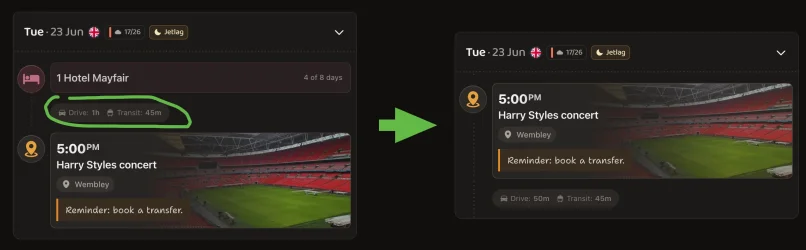
The rental car now shows as an item for every day of the 3 week period, which seems redundant and clutters the content.
Is there an option to simply show the collection and return events?

Hi @ayebee
Thanks for giving us a crack.
Item on each day is indeed an intentional design decision, with the same display logic applying to hotels and cruises for instance.
I can see why that might not be everyone's cup of tea though, so we've now added a toggle in "Settings > Display" to optionally hide those middle-day events.
View attachment 509919
Should point out, that the downside is you'll lose some of the auto-transport times/distances...
View attachment 509920
 . Have printed out the handy summary of the trip.
I'd try taking a screenshot of your train trip and emailing that through- hoping it contains the details of start and end locations plus times.We are about to embark on a 5 weeks trip. Received an email from tripwaffle with pre-trip info and suggestions
A question. We bought the Eurail Pass and will take trains in France and Switzerland. For trains to / from France and within France we were required to book seats (extra fees). We forwarded the emails to tripwaffle and train trips showed. Similarly, for scenic trains within Switzerland we were required to book seats (extra fees), we forwarded the emails to tripwaffle and train trips showed. However, for other Swiss train trips we were not required to pay for seats, is there a way of showing these on tripwaffle - manually? We have selected trains on the Rail Planner app, as well as the SBB mobile app, and only activate them on the day before we board the trains.
Thanks for the speedy reply. I will do the manual method now.I'd try taking a screenshot of your train trip and emailing that through- hoping it contains the details of start and end locations plus times.
Otherwise, you can always manually add events to your trip via the + button at the bottom of the trip. In this case Add > Transport (then select "Train" from the dropdown)
Thank you for the validation! Just looked at our data sources for QF12 and nothing is reporting a gate yet. Even looking up that flight on the Qantas website directly shows no gate yet. In this case, not much we can do unfortunately.I imported my trips from TripIt. I’ve noticed that qf12 is missing a gate number. Loved it that an Alaska airlines gate change from SEA d gates to n gates was sent as a notification when no one else did.

I can see why that might not be everyone's cup of tea though, so we've now added a toggle in "Settings > Display" to optionally hide those middle-day events.
And looks like the gate just got assigned: 150 at around 25mins prior to departure.I imported my trips from TripIt. I’ve noticed that qf12 is missing a gate number. Loved it that an Alaska airlines gate change from SEA d gates to n gates was sent as a notification when no one else did.
Qantas App and LaX site had it but I have no idea how you pull those sources.And looks like the gate just got assigned: 150 at around 25mins prior to departure.


Fair point: the widgets will now only show for trips you have "receives notifications" permission for in the share settings. I think this makes most sense, although was tossing up whether to use the "Include in stats" permission instead.@tripwaffle - The widget on Android shows your next upcoming trip. However, if someone else has shared a trip with you and you're not a traveller, it will show their trip if that's next in chronological order. I'd prefer to only see my upcoming trips on the widget. Could you either make this an option in settings or only show trips one is a traveller in please?
Thanks for finding this- it should be fixed now (both for your specific flight, and editing flight numbers going forward).I've got an interesting bug today.
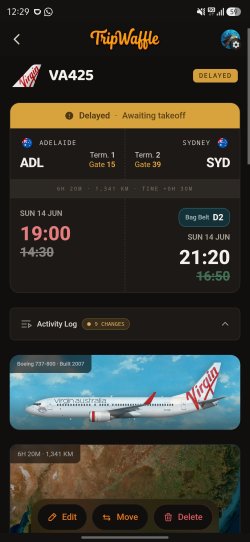
I was scheduled to fly ADL-SYD on VA441 at 19:00 this evening. I've used Virgin's excellent Fly Ahead benefit and put myself onto VA425 at 14:30 instead. When you do this you don't get a confirmation email from Virgin. So I went into TripWaffle and edited my event for VA441, changing the flight number to VA425 and blanking out the times. It hasn't worked as expected though. It seems to have sort of half-changed the flight, updating some details and not others and changing the times to the correct times for VA425, then marking the flight as delayed to the times that VA441 is at. Possibly I should have deleted the flight and added a new one instead, but that would have then removed my confirmation number and any notes etc. I might have attached to the flight.
I've attached a screenshot of what I'm seeing when I look at the event.