Alternative to TripIt = TripWaffle

SeatBackForward

Senior Member
Joined
Jun 20, 2006
Posts
5,694
Qantas
LT Gold
Oneworld
Emerald
TripIt's lack of development is disappointing, and the lack of calendar synchronisation is causing me issues. But I think I've finally found an alternative that seems to do the things I need, is much easier to use, and (for now at least) is free to use!


For me, the features I've liked:
  1. email to import itineraries
  2. Calendar sycnhing with Google/Outlook
  3. Drag and drop trip plan management
  4. And there's a whole bunch of other neat little Ai driven features, like a "jetlag" calculator!
Was able to download all my historical trips from TripIT into it in a few mins also!
 
Last edited:
Seems to be only apps and I also like a web based version when doing lots of bookings. These old eyes struggle with the phone
 
Can TripWaffle import your data ftom Tripit? Also is the former free?
Yep I just did it. You visit your TripIt page (after logging in). You need to enter your browser console (F12) and run a script that TripWaffle provides you from Your Free Travel Itinerary Manager - TripWaffle. This then downloads a JSON File onto your computer, this took about 10mins for my trips going back to 2010. Then in Tripwaffle you just upload the JSON file and it does it all including all the stats.

I haven't paid anything yet, the developers engaging on reddit, but it's free for now.
Seems to be only apps and I also like a web based version when doing lots of bookings. These old eyes struggle with the phone
I've done everything on my desktop so far. I've downloaded the app also, but and all it did was notify me when I emailed an itinerary that was added.
 
The developer added in a suggestion within an hour of me making it - to be able to add buffers to calendars before and after flight (for transfer/security/check ine tc). They even allow different buffers for international vs domestic flights by comparing city pairs!
 
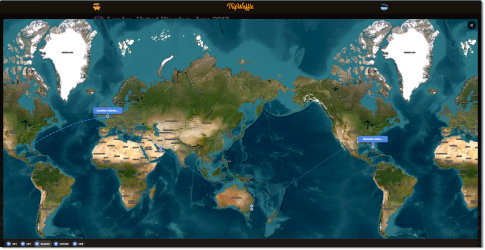
Another new feature added (by request again) for each trip, past or future, a mini-map showing each individual part of the booking - flights, hotels, events etc. Clicking on any shows you that item on the map.

1776428600466.png
 
How does it handle a single booking email with many segments spanning several months being nested with other bookings to make multiple separate return trips.
You can setup multiple email addresses that are recognised as your "from" address, so for example I have two work and one personal email addresses that I can send itineraries from. Note, it doesn't scan these email addresses, just recognises if they're sent from them.

Once the itinerary is in TripWaffle it will list all the segments associated with that specific itinerary. If you have emailed a different itinerary, or also you can just manually create a new trip, then you just drag-and-drop the individual segment out of one and into another. Each trip will then only cover the segments associated with it. Dead easy!

This feature is called the Organiser if you need to find it, just open any trip, then click on the edit "pencil" and it'll ask if you want to go to the organiser instead. Works in the app too. There's also an icon at the bottom labelled "reorganise" that takes you there.
 
Last edited:
I should clarify, I'm not associated with this app in anyway, just enthusiastic about having found a decent alternative to TripIt that ticks all my requirements.
 
TripIt's lack of development is disappointing, and the lack of calendar synchronisation is causing me issues.
Does TripWaffle update dynamically? ie does it monitor schedule changes/cancellations?

If not, calendar sync could be a two-edge sword. iOS already picks up most events and provides a calendar suggestion from the source email. If there’s an update/change notification email, it should suggest the change to the calendar.

If TripIt or TripWaffle is static and syncing with the calendar, it might force the wrong time?

I don’t think Tripcase (RIP) even did calendar sync. Flighty has it but can’t really comment on how well that works - I’m only on the free version.
 
Does TripWaffle update dynamically? ie does it monitor schedule changes/cancellations?

If not, calendar sync could be a two-edge sword. iOS already picks up most events and provides a calendar suggestion from the source email. If there’s an update/change notification email, it should suggest the change to the calendar.

If TripIt or TripWaffle is static and syncing with the calendar, it might force the wrong time?

I don’t think Tripcase (RIP) even did calendar sync. Flighty has it but can’t really comment on how well that works - I’m only on the free version.
Hi there, tripwaffle dev here.

We monitor flights from several sources, including airlines directly in many cases.
Any schedule changes will sync through your calendar feed, automatically.

Hope this answers your question.
 
Hi there, tripwaffle dev here.

We monitor flights from several sources, including airlines directly in many cases.
Any schedule changes will sync through your calendar feed, automatically.

Hope this answers your question.
Ok. Thanks and welcome!
Dammit now I want waffles!
Now I feel like waffles also! 😂
 
@tripwaffle I've added a few trips and it looks like a good app. However, I encountered one issue with the details for AY146 next February. Despite the ticket showing both legs (MEL - BKK & BKK - HEL), the app only shows the second leg. This is presumably because the MEL - BKK leg doesn't operate until later this year.
 
@tripwaffle I've added a few trips and it looks like a good app. However, I encountered one issue with the details for AY146 next February. Despite the ticket showing both legs (MEL - BKK & BKK - HEL), the app only shows the second leg. This is presumably because the MEL - BKK leg doesn't operate until later this year.
Hi Pete,

We investigated and turns out you found a bug: AY146 is a through-flight where Finnair uses the same flight number for both legs (on same date) and our deduping logic was incorrectly collapsing this into one event. Your MEL->BKK leg has been restored on the trip, and the same fix prevents this happening to any future through-flight bookings.

Apologies for this, and thanks for helping us improve.
 
Hi Pete,

We investigated and turns out you found a bug: AY146 is a through-flight where Finnair uses the same flight number for both legs (on same date) and our deduping logic was incorrectly collapsing this into one event. Your MEL->BKK leg has been restored on the trip, and the same fix prevents this happening to any future through-flight bookings.

Apologies for this, and thanks for helping us improve.
Thanks for the quick fix and reply!
 
Read our AFF credit card guides and start earning more points now.

AFF Supporters can remove this and all advertisements

Have downloaded app and will forward future trips to see how it works.

Not yet ready to forward previous trips (from Tripit) which date back to 2014 I think ;)
 

Become an AFF member!

Join Australian Frequent Flyer (AFF) for free and unlock insider tips, exclusive deals, and global meetups with 65,000+ frequent flyers.

AFF members can also access our Frequent Flyer Training courses, and upgrade to Fast-track your way to expert traveller status and unlock even more exclusive discounts!

AFF forum abbreviations

Wondering about Y, J or any of the other abbreviations used on our forum?

Check out our guide to common AFF acronyms & abbreviations.
Back
Top