



Alternative to TripIt = TripWaffle

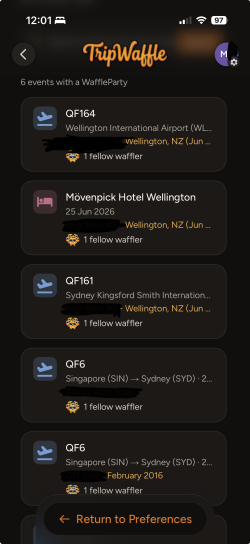
settings > preferences > Find events where you had a WaffleParty

A little panel will show on the event page too if there's a hit.

Finally, we'll let you know in the pre-trip email brief if there's any matches as well.
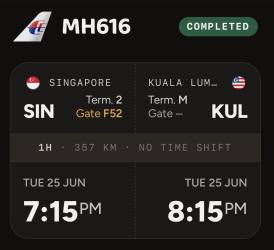
Cool - ok. 6 WaffleParty events for me, with the first dating back to the early 2010s on an MH flight from SIN-KUL
 
Just received my first Pre-Trip Briefing email.(dest: CNS)

Excellent.

As an aside, It says I am travelling with myself 🤣

Apparently picked up from somewhere in correspondence “JohnSmith” and “John Smith” as two separate passengers. No big deal, just amusing.
 
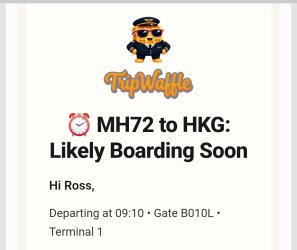
I'm at KLIA, travelling to HKG and received this:
Screenshot_20260818_081717_Gmail.jpg
KLIA has some multipurpose international/domestic gates. If I was travelling domestically, I'd be at B10.

But I'm not travelling domestically; for myself and the average punter, the gate is signed as H10 as it is international.
 
I'm at KLIA, travelling to HKG and received this:

KLIA has some multipurpose international/domestic gates. If I was travelling domestically, I'd be at B10.

But I'm not travelling domestically; for myself and the average punter, the gate is signed as H10 as it is international.
Fixed now; we've added a custom rule for KLIA.
Swept our other airports and this seems the only one affected.
Thanks for pointing this out.
 
For some reason my flight today from BNE gate 25 is showing T2 in tripwaffle. My boarding pass says D (which is correct)

Edit: now changed to gate 30 in “T2”
 
Last edited:
Read our AFF credit card guides and start earning more points now.

AFF Supporters can remove this and all advertisements

For some reason my flight today from BNE gate 25 is showing T2 in tripwaffle. My boarding pass says D (which is correct)

Edit: now changed to gate 30 in “T2”
Thanks for reporting this: was an inconsistency in data feeds vs how we display those terminals. Checked all other airports and it was an issue at Vancouver and San Francisco too. Now fixed and regression tests added.
 
Q1: I emailed TW a booking confirmation a few months ago. Now there has been one flight change to that booking. Does TW update it from the airline system? Or do I need to email TW the revised booking - there will only be one flight change, the rest stay the same.

Q2: there are 2 pax (same booking reference). But TW only shows 1 seat selected and not 2 seats. Should I email TW the 2 separate booking confirmations (one for each pax)?

Thanks!
 
Q1: I emailed TW a booking confirmation a few months ago. Now there has been one flight change to that booking. Does TW update it from the airline system? Or do I need to email TW the revised booking - there will only be one flight change, the rest stay the same.

Q2: there are 2 pax (same booking reference). But TW only shows 1 seat selected and not 2 seats. Should I email TW the 2 separate booking confirmations (one for each pax)?

Thanks!
Hi Myrna,

On the flight change: if the airline has just shifted the times on the same flight number, TripWaffle picks that up by itself and will let you know, nothing needed from you. If they've moved you onto a different flight number or a different day, we can't see that, so forward the revised confirmation through. Either way forwarding it is safe and best practice in some ways.

On the seats: yes, send both confirmations through and the second seat will join the first on the same flight, so you'll end up with both listed rather than two separate bookings.
 

Become an AFF member!

Join Australian Frequent Flyer (AFF) for free and unlock insider tips, exclusive deals, and global meetups with 65,000+ frequent flyers.

AFF members can also access our Frequent Flyer Training courses, and upgrade to Fast-track your way to expert traveller status and unlock even more exclusive discounts!

AFF forum abbreviations

Wondering about Y, J or any of the other abbreviations used on our forum?

Check out our guide to common AFF acronyms & abbreviations.
Back
Top