




joelby
Intern
- Joined
- Aug 25, 2023
- Posts
- 77
- Qantas
- Platinum 1
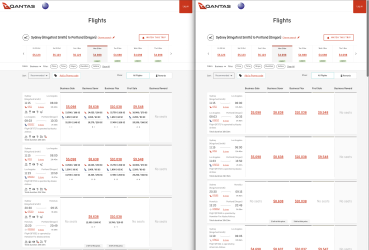
One thing that annoys me a bit with the Qantas international booking site is that it doesn't show the point/SC earn and aircraft type until you click on a fare, which makes it a lot slower to find status runs or preferred plane types. I created a Tampermonkey script which will display everything up front. I started this a long time ago, and then after sitting on it forever got Claude to finish it off. I'm sharing it in case it's useful for anyone else! You can find it at Qantas SC Display - Pastebin.com . You'll need the Tampermonkey browser extension.
The attached screenshot shows the result.
- Break down SC/point earn by Qantas and partners (useful for DSC promos)
- Show booking class per segment
- Always display icons for aircraft type, WiFi, seat pitch, etc.
I just noticed if there's no partner involved sometimes it sometimes shows the info row for one unnecessarily, but that doesn't affect the functionality.
The attached screenshot shows the result.
- Break down SC/point earn by Qantas and partners (useful for DSC promos)
- Show booking class per segment
- Always display icons for aircraft type, WiFi, seat pitch, etc.
I just noticed if there's no partner involved sometimes it sometimes shows the info row for one unnecessarily, but that doesn't affect the functionality.