



Script for displaying Qantas Booking Flight Options Detail

joelby

Intern
Joined
Aug 25, 2023
Posts
85
Qantas
Platinum 1
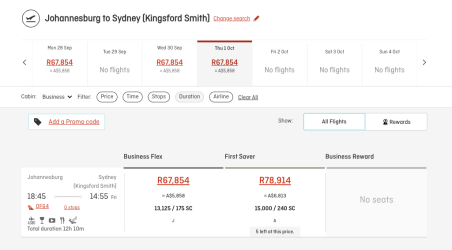
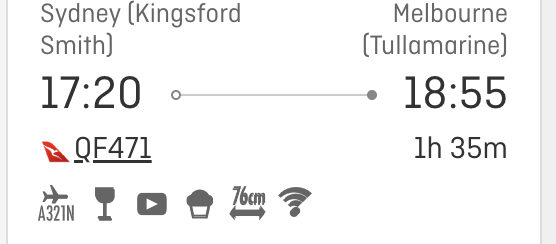
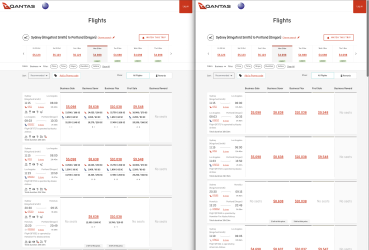
One thing that annoys me a bit with the Qantas international booking site is that it doesn't show the point/SC earn and aircraft type until you click on a fare, which makes it a lot slower to find status runs or preferred plane types. I created a Tampermonkey script which will display everything up front. I started this a long time ago, and then after sitting on it forever got Claude to finish it off. I'm sharing it in case it's useful for anyone else! You can find it at Qantas SC Display - Pastebin.com . You'll need the Tampermonkey browser extension.

The attached screenshot shows the result.

- Break down SC/point earn by Qantas and partners (useful for DSC promos)
- Show booking class per segment
- Always display icons for aircraft type, WiFi, seat pitch, etc.

I just noticed if there's no partner involved sometimes it sometimes shows the info row for one unnecessarily, but that doesn't affect the functionality.
 

Attachments
  • qantas-sc-display.png
    qantas-sc-display.png
    498.8 KB · Views: 134
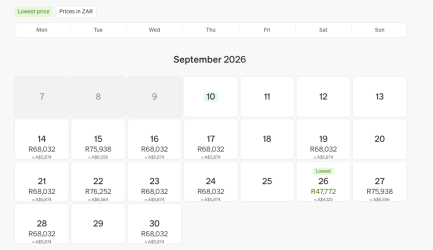
I've uploaded a new version! After scoring a CR F fare yesterday, I found myself needing to book a flight back home but had no idea how much things cost. The new version fetches exchange rates and displays AUD conversions inline.
 

Attachments

  • currency-1.png
    currency-1.png
    80.8 KB · Views: 71
  • currency-2.png
    currency-2.png
    76.5 KB · Views: 70
Great work - very nifty! Any chance the fare bucket/s could also be added to this script @joelby? The API does return them under the rbd/rbds attribute.
 
This is great thank you for sharing!

Is it something you could extend to the Domestic booking search as well for multi-city?

I often face this error where it doesn't show up at all, maybe your script could fix that?
1789198624495.png
 
You're welcome!

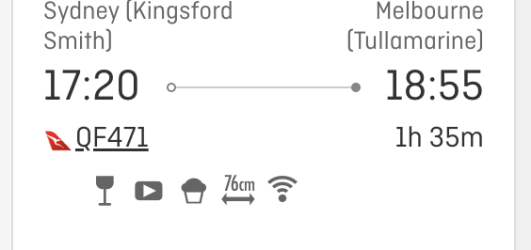
How's this? I just realised that it's not showing the amenity icons - will add these a bit later. It's already significantly nicer to use than the standard search though.. thanks for the great suggestion!
 

Attachments

  • domestic-booking.png
    domestic-booking.png
    179 KB · Views: 27
That looks so much better compared to how it shows up for me

Edit - have just updated your script, so good!!
 

Attachments

  • 1789205185168.png
    1789205185168.png
    753.9 KB · Views: 20
Last edited:
I've now fixed the amenity icons in domestic bookings and made the date selector show more dates if you have a wide browser window.
 
OK ... a non custom 'script' user/writer ... time to fess up - how do I install it, please? I've added Tampermonkey to Chrome, Googled for instructions, to no avail.
 
Elevate your business spending to first-class rewards! Sign up today with code AFF10 and process over $10,000 in business expenses within your first 30 days to unlock 10,000 Bonus PayRewards Points.
Join 30,000+ savvy business owners who:

✅ Pay suppliers who don’t accept Amex
✅ Max out credit card rewards—even on government payments
✅ Earn & transfer PayRewards Points to 10+ airline & hotel partners

Start earning today!
- Pay suppliers who don’t take Amex
- Max out credit card rewards—even on government payments
- Earn & Transfer PayRewards Points to 8+ top airline & hotel partners

AFF Supporters can remove this and all advertisements

Yeah, it's a bit fiddly!
  • Within Chrome, click the extensions icon at the top right - the jigsaw puzzle piece.
  • Click Tampermonkey, then Dashboard
  • This should load the Tampermonkey extension's dashboard. In the toolbar at the top right, to the left of Installed Userscripts, click the plus icon
  • It will then show a code editor. Delete all of the text in there.
  • From the Pastebin link click Raw, or you can go straight to https://pastebin.com/raw/cSMUVgtF
  • Copy all of the code from Pastebin
  • Paste it into the Tampermonkey editor window, then click File -> Save on the menu just above the editor
That should do it! It will be activated automatically the next time you load the Qantas booking page.

To update the script in future if I make any improvements, repeat these steps but instead of creating a new script, click on "Qantas SC display" in the list. You can then clear the code in the editor and copy/paste from Pastebin again.

Let me know if you have any trouble with these steps.
 
I've now fixed the amenity icons in domestic bookings and made the date selector show more dates if you have a wide browser window.
Thanks so much for this!

FYI, I noticed for A321 flights the icon doesn't appear. Hovering over where the icon would be, I get the text for it - "A321neo (narrowbody)"

If I click on a fare to expand, the icon shows up as normal for a QF flight, but expanding a JQ flight it stays blank/missing.

For example:

1789271648663.png1789271762202.png

Also noticed after clicking to expand a QF fare, the icons are slightly misaligned and get a little shadow effect because they don't perfectly overlap. Interestingly this doesn't seem to happen on a JQ flight.

And once expanded, the fares stay expanded. Clicking a different flight/fare doesn't minimise the previous one you had expanded like it normally would.

Very minor issues, and not complaints, just thought you'd want to know!
 

Attachments

  • 1789271249436.png
    1789271249436.png
    56.3 KB · Views: 5
Last edited:
Fixed! Script has been updated. Yes, it was an issue with A321neo specifically.

I also noticed that once you expand the fare the amenity icons were duplicated, making them look a bit fuzzy. That's also fixed.
 

Become an AFF member!

Join Australian Frequent Flyer (AFF) for free and unlock insider tips, exclusive deals, and global meetups with 65,000+ frequent flyers.

AFF members can also access our Frequent Flyer Training courses, and upgrade to Fast-track your way to expert traveller status and unlock even more exclusive discounts!

AFF forum abbreviations

Wondering about Y, J or any of the other abbreviations used on our forum?

Check out our guide to common AFF acronyms & abbreviations.
Back
Top