






- Joined
- Jul 8, 2007
- Posts
- 3,424
- Qantas
- Platinum 1
- Virgin
- Red
- Oneworld
- Emerald
Not sure if it's just me, but I'm noticing that my user account is not consistently remaining in a persistent "logged-in" state on any of my devices (e.g. iPhone, iPad, MacBook, Windows laptop).
I use a passkey and am finding that my user account is regularly logged out (without me actively logging out) and I'm forced to sign back in again. I note there is occasionally a 2FA prompt after logging in where you can opt to "Trust this device for 30 days", but this does not appear to be getting honoured by the site.
I'm encountering this behaviour if -:
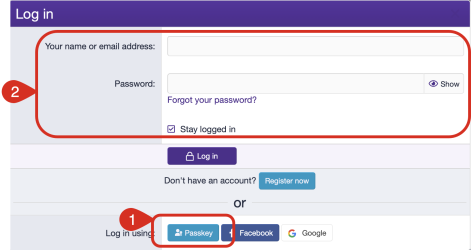
Essentially, within the next couple of days (if not sooner), I'm expecting to find that I have been logged out of AFF on one or more of my devices, despite me not manually actioning the logout and having explicitly ticked the "Stay logged in" option.
Is anyone else seeing similar behaviour?
I use a passkey and am finding that my user account is regularly logged out (without me actively logging out) and I'm forced to sign back in again. I note there is occasionally a 2FA prompt after logging in where you can opt to "Trust this device for 30 days", but this does not appear to be getting honoured by the site.
I'm encountering this behaviour if -:
- Logging in directly using Passkey (1), or
- Logging in using username and password + ticking the "Stay logged in" checkbox (2)
Essentially, within the next couple of days (if not sooner), I'm expecting to find that I have been logged out of AFF on one or more of my devices, despite me not manually actioning the logout and having explicitly ticked the "Stay logged in" option.
Is anyone else seeing similar behaviour?



 . No, I use Chrome on my iPhone.


 (no sign though of the error/notification message I spotted earlier)