
- Joined
- Apr 25, 2011
- Posts
- 1,007
- Qantas
- LT Silver
- Virgin
- Red
Hi, haven't used an eSIM before so looking for any recommendations for an NZ resident on One NZ for use in Australia. Thanks for any help available.






Would use your current provider, as you keep your current 64 phone number.Hi, haven't used an eSIM before so looking for any recommendations for an NZ resident on One NZ for use in Australia. Thanks for any help available.

BTW, what type of phone do you have?Just data. 5gb should be sufficient
Thanks for that detail, very helpful. I've got an iPhone 12. We fly tomorrow and I've gone with Saily (associated with Nord VPN apparently) so will be interesting.BTW, what type of phone do you have?
eSIMs can seem a little fiddly first time around depending on which provider you use. The better providers have great apps that make it pretty seamless, some you scan a QR code and occasionally I’ve resorted to manually entering the info.
Regardless of which provider you end up using for Oz, what you can do is get one of the freebie (usually low data ones) for NZ and try that at home and get a feel for how the dual sim works on your phone.
On an iPhone, the dual sim settings are usually hidden if you are on a physical SIM.
Once you install your first eSIM, you see there’s now duplicate phone settings for each phone line grouped by each line.
The most important one being “Data Roaming” On/Off for each line.
At the top “Mobile” settings menu, you’ll see which line is the default line for Data and which is the default line for “Voice” (and text).
When you’re heading OS, make sure Data roaming is turned OFF on you regular phone line. That will stop it activating roaming charges when you land! You should still be able to receive SMS for free. Just don’t send an SMS, make or receive a call and your home line shouldn’t charge you - even though you can have your main line turned on OS.
Depending on the eSIM you chose, it’s usually best to install the eSIM over stable wifi before you fly. Check what needs to be done to “activate” the plan you have - sometimes that’s via an app (so you’ll need wifi) but often it just turning the line ON and then turn on Data Roaming and switch the default Data line eSIM. That’s often enough to get it going and you’ll have data when you land.
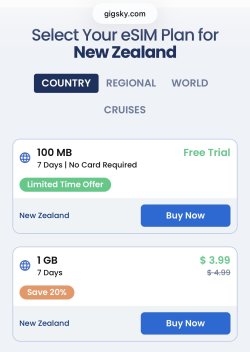
GigSky is a reputable provider albeit a bit expensive compared to others but they do have a free trial plan (including NZ) if you wanted to play around with eSIMs at home.
View attachment 503722
And it seems to be working well. Activation was straight forward and I'm using it in Sydney to post this.Thanks for that detail, very helpful. I've got an iPhone 12. We fly tomorrow and I've gone with Saily (associated with Nord VPN apparently) so will be interesting.
If you haven’t already, turn the eSIM line to “Low Data mode”. That should stop a bunch of stuff gobbling up data in the background and also stop devices tethered to your phone churning thru data.And it seems to be working well. Activation was straight forward and I'm using it in Sydney to post this.
Thanks for that, learning all the timeIf you haven’t already, turn the eSIM line to “Low Data mode”. That should stop a bunch of stuff gobbling up data in the background and also stop devices tethered to your phone churning thru data.
Better still, go thru the list of apps with permission to use mobile data. Disable all that you don’t need (they’ll still work over wifi). It’s a slight PITA, but stops those apps using data in the background.
Turn them back on when you get home (or sitting on the plane).
See my post above. Turn off access to mobile data to apps that aren’t important.Modern phones, one thing that irked me while I was over in NZ for those few days, it was to do with a new Opel 65sx that I have started using, is the notification, every few mins, pling, pling, pling, I dodnt want to turn off the notifications, in case QF4 was delayed, or cancelled, lucky it wasnt.
Every pling, does use up about 1byte of data.

AFF Supporters can remove this and all advertisements







