




Alternative to TripIt = TripWaffle

Possible bug (or user error)? I have a trip with a string of empty days then one day with an event then a string of empty days. "Display empty days" setting is ticked. The first string is not displayed (so, NOT as per setting) but the second string is displayed as per setting. See below.
Any run of more than 7 empty days in a row gets shortened to one "13 days later" line, even with empty days switched on. Your first gap was 13 days, so it folded. Your second was exactly 7, so it showed.

This was poorly explained though, so I've turned it into an additional setting (under "display"):
"Shorten long empty stretches"

Thanks for flagging it.
 
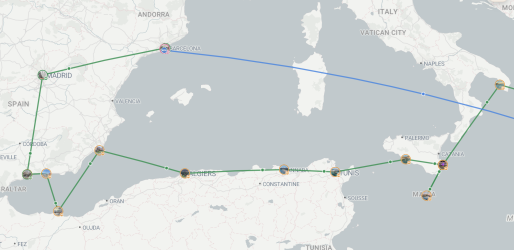
Could the trip map, when incorporating cruises and railways, show better routings? For instance cruise legs not going overland and railway (in this case Malaga to Madrid to Barcelona) maybe follow Google maps routing? Neither will be exact, but better than present.

1792227359606.png
 
Flagging a couple of things related to display order of events. Both examples I've spotted when updating a past trip, but mentioning them in case there's an underlying issue.

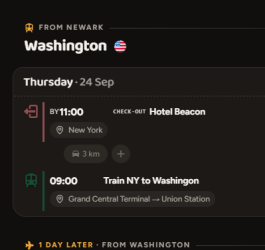
First one, shouldn't the 9am train appear before the 11am check out?

1792285095854.png

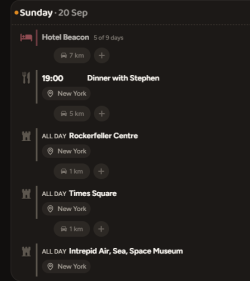
Secon one is that I'm wondering about the logic behind placement of entries where no time is listed? In the example below, dinner would be better at the end of the list.

1792285428837.png

I'm now adding indicative times so shouldn't be an issue for me on future trips.
 
First one, shouldn't the 9am train appear before the 11am check out?

It's intentional here to show check-out first as it likely matches the order you'll be doing these things in.

Secon one is that I'm wondering about the logic behind placement of entries where no time is listed? In the example below, dinner would be better at the end of the list.

Items with no time always go below timed ones. Among themselves they keep the order they were added. Rationale: if you had a flight on that day, you'd probably want the all day event(s) to come after it.

Happy to kick this around more though if you think there's room for improvement, of course.
 
It's intentional here to show check-out first as it likely matches the order you'll be doing these things in.
Makes sense. Thanks.

Items with no time always go below timed ones. Among themselves they keep the order they were added. Rationale: if you had a flight on that day, you'd probably want the all day event(s) to come after it.

Happy to kick this around more though if you think there's room for improvement, of course.
No, if it's displaying as intended, all good.

Do tours that include a flight count towards flight stats? (eg. sightseeing, heli-tours, island flight transfers etc)
 
Last edited:
Elevate your business spending to first-class rewards! Sign up today with code AFF10 and process over $10,000 in business expenses within your first 30 days to unlock 10,000 Bonus PayRewards Points.
Join 30,000+ savvy business owners who:

✅ Pay suppliers who don’t accept Amex
✅ Max out credit card rewards—even on government payments
✅ Earn & transfer PayRewards Points to 10+ airline & hotel partners

Start earning today!
- Pay suppliers who don’t take Amex
- Max out credit card rewards—even on government payments
- Earn & Transfer PayRewards Points to 8+ top airline & hotel partners

AFF Supporters can remove this and all advertisements

Become an AFF member!

Join Australian Frequent Flyer (AFF) for free and unlock insider tips, exclusive deals, and global meetups with 65,000+ frequent flyers.

AFF members can also access our Frequent Flyer Training courses, and upgrade to Fast-track your way to expert traveller status and unlock even more exclusive discounts!

AFF forum abbreviations

Wondering about Y, J or any of the other abbreviations used on our forum?

Check out our guide to common AFF acronyms & abbreviations.
Back
Top