Alternative to TripIt = TripWaffle

Probably simplest thing in this scenario, is to give each other 'auto-share' access (in settings) to both your trips. Then it pretty much doesn't matter who forwards the emails, as you both get access to all trips.

Another real-world example: my wife starts a trip and gives me editor access. I then forward a booking email and it will automatically land in that shared trip. Hope that makes sense?
Thanks very much it is now working well. Great service as usual by you
 
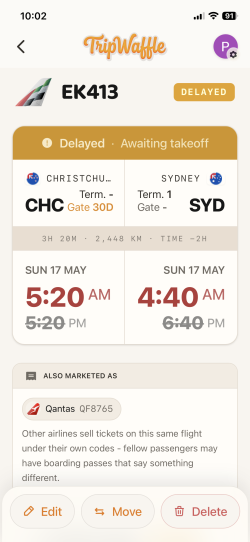
Something is a bit strange with our flight later today. This is what shown now - flight delayed, but as far as we know flight is on time.
 

Attachments

  • IMG_4052.png
    IMG_4052.png
    625.6 KB · Views: 9
Something is a bit strange with our flight later today. This is what shown now - flight delayed, but as far as we know flight is on time.
Very sorry about this; one of our data providers was returning local time but with a a misleading Z (UTC) suffix e.g. "2026-05-16T17:20:00Z" which polluted the schedule.

Will work on adding some extra layers of checks today. Thank you for letting me know.
 
Is it possible to have TW app on 2 different phones - mine and hubby’s - with the same email? Or as you have suggested in another post, to add another email address for hubby’s phone access?
 
Is it possible to have TW app on 2 different phones - mine and hubby’s - with the same email? Or as you have suggested in another post, to add another email address for hubby’s phone access?
Absolutely. Two choices:
a) login with the same email / account
b) use seperate logins but auto-share all trips with each other via Settings (tap avatar in top-right) -> Auto-Share
 
I have signed up but have to use a gmail account which I never use. My friend wants to share all his trips and it has gone to my outlook account.

I have created the outlook as an alias but still can't work out how I can see his trips

btw - he doesn't do any social media but loves the program and said he has been emailing you with queries and suggestions and is very happy
 
I have signed up but have to use a gmail account which I never use. My friend wants to share all his trips and it has gone to my outlook account.

I have created the outlook as an alias but still can't work out how I can see his trips

btw - he doesn't do any social media but loves the program and said he has been emailing you with queries and suggestions and is very happy
Hi there, thanks for the kind words... would you mind sharing your user id number please so that I can investigate? Located by clicking the profile pic in the top-right.
 
Hi there, thanks for the kind words... would you mind sharing your user id number please so that I can investigate? Located by clicking the profile pic in the top-right.
It may have been user error because I didn't click on the waffle icon and I was chatting to him and in the meantime he added my gmail account as well. Thanks anyway
 
Elevate your business spending to first-class rewards! Sign up today with code AFF10 and process over $10,000 in business expenses within your first 30 days to unlock 10,000 Bonus PayRewards Points.
Join 30,000+ savvy business owners who:

✅ Pay suppliers who don’t accept Amex
✅ Max out credit card rewards—even on government payments
✅ Earn & transfer PayRewards Points to 10+ airline & hotel partners

Start earning today!
- Pay suppliers who don’t take Amex
- Max out credit card rewards—even on government payments
- Earn & Transfer PayRewards Points to 8+ top airline & hotel partners

AFF Supporters can remove this and all advertisements

One of my flights (FR24 import) has been nested into another trip.

Using the "move" button on that flight brings up the last dozen or so trips. However, the trip I need is back in 2022.

Is there any way to extend this list @tripwaffle or another way to move the flight?
 
One of my flights (FR24 import) has been nested into another trip.

Using the "move" button on that flight brings up the last dozen or so trips. However, the trip I need is back in 2022.

Is there any way to extend this list @tripwaffle or another way to move the flight?
Reorganizer tool is the go, as you can search for any trip:

Use the 'pin' buttons to select which trips do/don't display on that page.
 
@tripwaffle

Just an amusing minor problem purely for your information. On a trip to France we took a return day train trip from Lyon to the small city of Vienne about 30 km south. The trip has been listed correctly from the e-mailed booking. However in the Trip Map it was displayed as a trip to the capital of Austria rather than to a sleepy small French town. In French Vienna, Austria is spelled the same way as Vienne, Isère - the original Latin name for it as actually Vienna. It appears that when I imported this trip Vienne was 'auto-translated' into Vienna. I have solved the problem by an edit but I was a bit puzzled when I first looked at the Trip Map and saw a strange eastward journey shown.
 
Last edited:
@tripwaffle

Actually the French language seems to be a bit of a bête noire for the TripWaffle mapping system. On the same trip we travelled from Frankfurt to Strasbourg on a SNCF train. The ticket used the French spelling of Francfort and this was not recognised and a gap left in the Trip Map. Again easily corrected with an edit.
 
Did someone say bug?
Made a tweak to the geocoder to include country on the place name, which will make these lookups more reliable going forward. e.g.
"Vienne, FR" / "Francfort, DE"
Thank you for calling it out 🙇

Thanks for the quick action.
 
Re splitting trips

I’m have to breakup trips imported from myFR24 into separate ones a couple of times. What I've been doing is to create an empty new trip. This gets presented with the Active trips at the top of the Dashboard.

I then click 'reorganize'. (we'll let the American selling go by ... :) )

This brings up the 'reorganizer' , including the new, empty trip.

I then search for the trip that has the events I want to move and this brings it up alongside the new one. I then drag the events from the existing trip to the new trip. and save the new trip.

I'm going need to do this a few more times - is that the most efficient way @tripwaffle ?

BTW the trip parsing from myFR24 didn't always work well. On the occasions I needed to split, there was trip 1 Hobart - somewhere - Hobart then, a few days later trip 2 Hobart - somewhere else - Hobart. Seemed pretty straightforward flights back and out again.

I'll flag the next one I find, or is it just a result of an imperfect world?

 
Re splitting trips

I’m have to breakup trips imported from myFR24 into separate ones a couple of times. What I've been doing is to create an empty new trip. This gets presented with the Active trips at the top of the Dashboard.

I then click 'reorganize'. (we'll let the American selling go by ... :) )

This brings up the 'reorganizer' , including the new, empty trip.

I then search for the trip that has the events I want to move and this brings it up alongside the new one. I then drag the events from the existing trip to the new trip. and save the new trip.

I'm going need to do this a few more times - is that the most efficient way @tripwaffle ?

BTW the trip parsing from myFR24 didn't always work well. On the occasions I needed to split, there was trip 1 Hobart - somewhere - Hobart then, a few days later trip 2 Hobart - somewhere else - Hobart. Seemed pretty straightforward flights back and out again.

I'll flag the next one I find, or is it just a result of an imperfect world?

Basically yes, best way at the moment.

Backing up, on FR24 import we're starting a new trip based on this (albeit crude) logic:
(home-return detected AND gap between flights >= 6h) OR (gap >= 14 days)

If, say, you think it makes more sense to reduce that gap to 7 days, I'd be happy to run it against your account?
You'd go from 317 trips to 408 in that scenario.

Happy to help slice it however you want, ideally in a manner that's better for all importers of trips.

Core question: what defines a different trip?
 
Core question: what defines a different trip?
Tough one.

It’ll be different for different travellers.

I had a four day trip BNE-SYD and then on one of those days was required in ABX.

Was it part of one trip? A different trip? Does it even matter?

My point being, it won’t be perfect for every case, but if you make the logic clear (as in the post above) anyone who wants to split/join trips can do so.

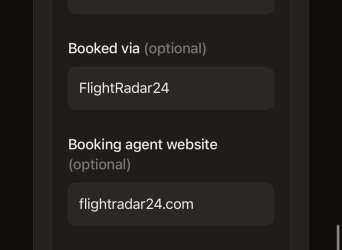
On FR24 imports, I don’t suppose there’s an easy way to delete FR24 from these two fields:

IMG_8325.jpeg
 

Become an AFF member!

Join Australian Frequent Flyer (AFF) for free and unlock insider tips, exclusive deals, and global meetups with 65,000+ frequent flyers.

AFF members can also access our Frequent Flyer Training courses, and upgrade to Fast-track your way to expert traveller status and unlock even more exclusive discounts!

AFF forum abbreviations

Wondering about Y, J or any of the other abbreviations used on our forum?

Check out our guide to common AFF acronyms & abbreviations.
Back
Top