Alternative to TripIt = TripWaffle

Probably simplest thing in this scenario, is to give each other 'auto-share' access (in settings) to both your trips. Then it pretty much doesn't matter who forwards the emails, as you both get access to all trips.

Another real-world example: my wife starts a trip and gives me editor access. I then forward a booking email and it will automatically land in that shared trip. Hope that makes sense?
Thanks very much it is now working well. Great service as usual by you
 
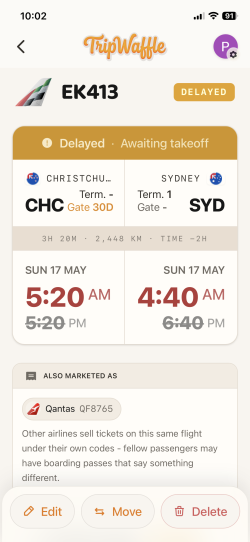
Something is a bit strange with our flight later today. This is what shown now - flight delayed, but as far as we know flight is on time.
 

Attachments

  • IMG_4052.png
    IMG_4052.png
    625.6 KB · Views: 9
Something is a bit strange with our flight later today. This is what shown now - flight delayed, but as far as we know flight is on time.
Very sorry about this; one of our data providers was returning local time but with a a misleading Z (UTC) suffix e.g. "2026-05-16T17:20:00Z" which polluted the schedule.

Will work on adding some extra layers of checks today. Thank you for letting me know.
 
Is it possible to have TW app on 2 different phones - mine and hubby’s - with the same email? Or as you have suggested in another post, to add another email address for hubby’s phone access?
 
Is it possible to have TW app on 2 different phones - mine and hubby’s - with the same email? Or as you have suggested in another post, to add another email address for hubby’s phone access?
Absolutely. Two choices:
a) login with the same email / account
b) use seperate logins but auto-share all trips with each other via Settings (tap avatar in top-right) -> Auto-Share
 
I have signed up but have to use a gmail account which I never use. My friend wants to share all his trips and it has gone to my outlook account.

I have created the outlook as an alias but still can't work out how I can see his trips

btw - he doesn't do any social media but loves the program and said he has been emailing you with queries and suggestions and is very happy
 
I have signed up but have to use a gmail account which I never use. My friend wants to share all his trips and it has gone to my outlook account.

I have created the outlook as an alias but still can't work out how I can see his trips

btw - he doesn't do any social media but loves the program and said he has been emailing you with queries and suggestions and is very happy
Hi there, thanks for the kind words... would you mind sharing your user id number please so that I can investigate? Located by clicking the profile pic in the top-right.
 
Hi there, thanks for the kind words... would you mind sharing your user id number please so that I can investigate? Located by clicking the profile pic in the top-right.
It may have been user error because I didn't click on the waffle icon and I was chatting to him and in the meantime he added my gmail account as well. Thanks anyway
 
Elevate your business spending to first-class rewards! Sign up today with code AFF10 and process over $10,000 in business expenses within your first 30 days to unlock 10,000 Bonus PayRewards Points.
Join 30,000+ savvy business owners who:

✅ Pay suppliers who don’t accept Amex
✅ Max out credit card rewards—even on government payments
✅ Earn & transfer PayRewards Points to 10+ airline & hotel partners

Start earning today!
- Pay suppliers who don’t take Amex
- Max out credit card rewards—even on government payments
- Earn & Transfer PayRewards Points to 8+ top airline & hotel partners

AFF Supporters can remove this and all advertisements

Become an AFF member!

Join Australian Frequent Flyer (AFF) for free and unlock insider tips, exclusive deals, and global meetups with 65,000+ frequent flyers.

AFF members can also access our Frequent Flyer Training courses, and upgrade to Fast-track your way to expert traveller status and unlock even more exclusive discounts!

AFF forum abbreviations

Wondering about Y, J or any of the other abbreviations used on our forum?

Check out our guide to common AFF acronyms & abbreviations.
Back
Top