Alternative to TripIt = TripWaffle

Minor fix @tripwaffle.

I've noticed that flights imported from Flightradar24 are not reading the flight reason correctly.

Flight reason 2 is importing as "crew", where it should be "work".

reason=0 -> 'business'
reason=1 -> 'leisure'
reason=2 -> 'work' (just fixed; was 'crew')
reason=3 -> (never seen)
reason=4 -> ?

Thanks for reporting.
 
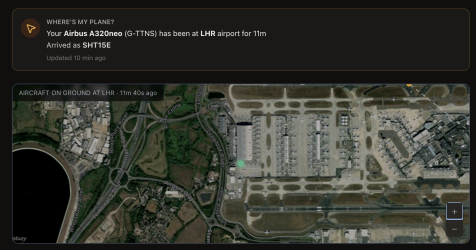
Are there any plans to track incoming flights - for the delays notification?
We are tracking inbound already in some instances, but it's all a matter of data coverage, and we're cheap like that ;)

In terms of using this for delay notifications: it gets pretty complicated, as airlines can swap aircraft (if they have any available) at the last moment. So in a way, you'd also have to know what other nearby inventory is on hand.

There's essentially an unlimited amount of analysis/optimisation you can do on flight tracking / prediction so we're mostly focused on easy wins at this stage.

Screenshot 2026-05-10 at 5.14.45 pm.png
 
I have "long itineraries" and the dashboard looks messy - can this be improved? Suggestion: possibly display a month of visible days, with an adjustable slider to move the visible month left or right....1778401800589.png
 
I have "long itineraries" and the dashboard looks messy - can this be improved? Suggestion: possibly display a month of visible days, with an adjustable slider to move the visible month left or right....
My bad, we should of tested this scenario. Now fixed to dynamically drop date labels, which is functional for now.

Screenshot 2026-05-10 at 7.52.52 pm.png
 
Hi @tripwaffle I'm having fun manually keying in flights from last year or so, it's like a trip down memory lane :) Two questions:

1. Flight QF33 from PER > CDG about a year ago comes up only as SYD > PER (the leg I wasn't on) - how can I manually correct that?
2. Only the one QF Dom flight from this month shows actual depart/arrive times. Everything older has nothing... am I doing something wrong?

Thank you
 
Hi @tripwaffle I'm having fun manually keying in flights from last year or so, it's like a trip down memory lane :) Two questions:

1. Flight QF33 from PER > CDG about a year ago comes up only as SYD > PER (the leg I wasn't on) - how can I manually correct that?
2. Only the one QF Dom flight from this month shows actual depart/arrive times. Everything older has nothing... am I doing something wrong?

Thank you

Oh boy, was this a rabbit hole.

1. As you identified: QF33 is a multi-leg flight, which ordinarily we'd match the upcoming leg/segment based on booking email details. Understand the need to correct historic flights though, so now it's possible to change airports/times from the add/edit flight page.

2. We're not fetching enrichment details for historic flights, only upcoming ones. Rationale is its expensive- a single tripit import would generate hundreds of lookups for us. Plus data gets patchier the further back you go (we could realistically only do 6-12 months back at present).

Hope all this makes sense, but shout if I've missed anything. Appreciate the feedback.
 
Oh boy, was this a rabbit hole.

1. As you identified: QF33 is a multi-leg flight, which ordinarily we'd match the upcoming leg/segment based on booking email details. Understand the need to correct historic flights though, so now it's possible to change airports/times from the add/edit flight page.

2. We're not fetching enrichment details for historic flights, only upcoming ones. Rationale is its expensive- a single tripit import would generate hundreds of lookups for us. Plus data gets patchier the further back you go (we could realistically only do 6-12 months back at present).

Hope all this makes sense, but shout if I've missed anything. Appreciate the feedback.
Magic, thank you!

1. I have adjusted, and now looking good
2. Understood... just checking I wasn't making a mistake

I'm enjoying, keep up the good work
 
I broke the robot :)
1778510382129.png
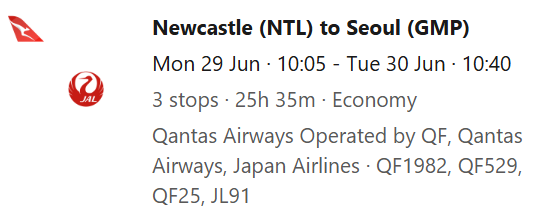
...but it's not entirely your fault, TripWaffle robot. Booking.com was the only way I could get this fare, but the way it displays the itinerary (all of in the email as well as via the online Manage Booking portal) is really stupid.

The robot parsed this as a single flight from NTL to GMP, with a flight number equal to the concatenation of all of the individual flight numbers.

I don't expect you to fix this - this is a bit of an edge case that isn't worth it when it really is Booking.com's interface (from a usefulness/truthfulness point of view) is at fault (to put it most diplomatically).
 
Read our AFF credit card guides and start earning more points now.

AFF Supporters can remove this and all advertisements

I broke the robot :)
View attachment 506894
...but it's not entirely your fault, TripWaffle robot. Booking.com was the only way I could get this fare, but the way it displays the itinerary (all of in the email as well as via the online Manage Booking portal) is really stupid.

The robot parsed this as a single flight from NTL to GMP, with a flight number equal to the concatenation of all of the individual flight numbers.

I don't expect you to fix this - this is a bit of an edge case that isn't worth it when it really is Booking.com's interface (from a usefulness/truthfulness point of view) is at fault (to put it most diplomatically).
The "fix" was to open my itinerary using Qatar Airways, "resend" the trip summary to myself (which had a better format than Booking.com), then forward that to the robot, and hey-ho presto...

While we are at it, I had two PNRs with the exact same flight, just two different days (OK, one day apart from each other). The robot ended up creating only one of the flights, but marked it as belonging to the two different PNRs. Understandable that the robot might not suspect anyone would fly the exact same flight number two days in a row and think I was sending two versions of the same booking (with oddly different PNRs).
 
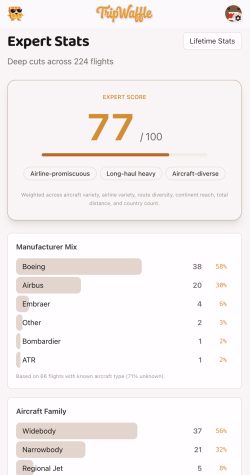
Ummmm ... you mean this @tripwaffle ? 🤣 Oops. :oops: But what's going on? 547 flights, but the mix down below is only looking at 7?
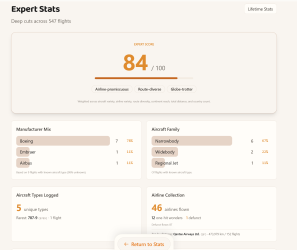
Also, do these stats include planned trips, or just past ones?

1778541211712.png
 

Become an AFF member!

Join Australian Frequent Flyer (AFF) for free and unlock insider tips, exclusive deals, and global meetups with 65,000+ frequent flyers.

AFF members can also access our Frequent Flyer Training courses, and upgrade to Fast-track your way to expert traveller status and unlock even more exclusive discounts!

AFF forum abbreviations

Wondering about Y, J or any of the other abbreviations used on our forum?

Check out our guide to common AFF acronyms & abbreviations.
Back
Top