Alternative to TripIt = TripWaffle

On the Lifetime Stats page, what's the criteria/logic for filling in the countries visited map @tripwaffle?

One of my trips include a transit at PEK, in about 2215hrs and out 1230hrs the following day and it's not picking up China as a country visited.

Is there a minimum stay duration built in to how the stats are generated?
 
@SeatBackForward and @Airbumps ... I believe the widget scroll arrows should appear for you now (upon refresh). The diagnostics page should show you a positive indication for "Carousel arrows visible?". Cheers.
Can confirm, the arrows now appear upon hover. I'm certain I saw them there a few days ago, then they were gone again, but now they're back!
 
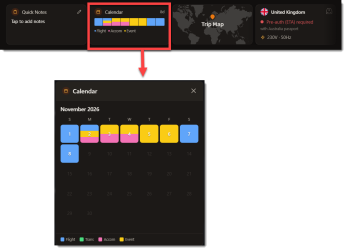
Just saw this - a very cool addition!

1777861458496.png


I used to create these manually for myself on trips ! I assume these are shown in the Timezone you're viewing from?
 

Attachments

  • 1777861432292.png
    1777861432292.png
    46 KB · Views: 3
Loving TripWaffle, thank you for making it! Add my vote to real offline support being a high priority.

One other feature that could be useful, but also opening a can of worms considering how many programs there are, would be to show the expected status credit (and points) earn (and produce a total per booking and for the upcoming year).
 
Loving TripWaffle, thank you for making it! Add my vote to real offline support being a high priority.

One other feature that could be useful, but also opening a can of worms considering how many programs there are, would be to show the expected status credit (and points) earn (and produce a total per booking and for the upcoming year).
Cheers for sharing that feedback.
TBH I'm pretty naive when it comes to the points game... in terms of researching the request, anywhere you could point me to learn the basics / mechanics?
 
On the Lifetime Stats page, what's the criteria/logic for filling in the countries visited map @tripwaffle?

One of my trips include a transit at PEK, in about 2215hrs and out 1230hrs the following day and it's not picking up China as a country visited.

Is there a minimum stay duration built in to how the stats are generated?
A flight arrival is treated as a transit (and the country gets dropped from the map) when ALL of these hold:
  • The next flight departs from the same airport / metro area (within 100km)
  • The gap is < 24 hours
  • No Accommodation event in that country between the two flights
  • No other non-transport event in that country between the two flights
Always happy to reconsider our logic, or you could fudge it by adding a "stayed at airport hotel" accommodation event in China between the two flights.
 
On the Lifetime Stats page, what's the criteria/logic for filling in the countries visited map @tripwaffle?

One of my trips include a transit at PEK, in about 2215hrs and out 1230hrs the following day and it's not picking up China as a country visited.

Is there a minimum stay duration built in to how the stats are generated?
Is this an imported trip?
I find that TW doesn't like items/addresses/locations from TripIt imports - it populates the data, but doesn't think about it. I have to go and update the location/flight for it to realise where it is, pull an image, put it on the map, etc.
 
Very cool app - thanks for creating it!

I imported my Tripit history and found that it has misclassified some Sydney flights as YQY instead of SYD (e.g. Your Free Travel Itinerary Manager - TripWaffle). Is there any way to edit the flight origin/destination? I can't see a way to do it through Edit.
Hi and thanks for flagging this. Both Sydney legs (JQ769 / JQ762) had picked up Sydney, Nova Scotia (YQY) instead of Sydney, Australia (SYD) from your TripIt source data. We've corrected the airports and timezones on both. The departure/arrival times themselves were corrupted by the timezone confusion at the source, so they may now look off in the timeline: you can fix the HH:MM values via the Edit button on each event.
Adding origin/destination fields to the flight Edit form is a "maybe", but we mostly prefer to retrieve those details from live data sources at present.
 
Amazing service. Thank you!

I edited the times and there's still something strange happening - it's showing the my times with a strike-through and different times above it, and it still says 14h 30m · 1,164 km for ADL-SYD. However the flight is no longer showing up in my Longest Flight, so maybe this is just a display issue. No big deal!
 
Amazing service. Thank you!

I edited the times and there's still something strange happening - it's showing the my times with a strike-through and different times above it, and it still says 14h 30m · 1,164 km for ADL-SYD. However the flight is no longer showing up in my Longest Flight, so maybe this is just a display issue. No big deal!
Sorted. Historical imports are a bit of a recent bolt-on feature for us, so still sorting out a few quirks with how all this interacts apologies. We'll look at this a little closer today.
 
Thanks a lot! I ran into another one related to the flight origin/destination - I manually added an old flight from 2011, but I guess because the flight couldn't be looked up it was added with no origin or destination and there was no way to set or change it. I ended up finding a Word document with the booking info and it imported that properly, after I converted it from doc to docx.

It also imported an old Virgin Blue (DJ) itinerary as Air Djibouti - TripWaffle - Travel planning, fixed. . Again it's not a big deal.. it's just so much fun to import old data and play around and look at the stats in a way that I never bothered to do with TripIt!

Edit - I kept reading back through the thread and realised this had already been flagged.
 
Last edited:
Thanks a lot! I ran into another one related to the flight origin/destination - I manually added an old flight from 2011, but I guess because the flight couldn't be looked up it was added with no origin or destination and there was no way to set or change it. I ended up finding a Word document with the booking info and it imported that properly, after I converted it from doc to docx.

It also imported an old Virgin Blue (DJ) itinerary as Air Djibouti - TripWaffle - Travel planning, fixed. . Again it's not a big deal.. it's just so much fun to import old data and play around and look at the stats in a way that I never bothered to do with TripIt!

Edit - I kept reading back through the thread and realised this had already been flagged.
You actually raised a really good work around though for old flights... just send an email to robot@ with the specific details you want to capture. Best practice would be something like the below (include airline name and airport codes)...

--- Trip name: Vietnam 2011 ---

Flight: Virgin Blue DJ206
Adelaide (ADL) → Melbourne (MEL)
Thu 3 Nov 2011, 8:15 PM → 9:30 PM (local)

Flight: Vietnam Airlines VN780
Melbourne (MEL) → Ho Chi Minh City (SGN)
Fri 4 Nov 2011, 12:25 AM → 9:05 AM (local)

Hotel: Park Hyatt Saigon
Check-in: Fri 4 Nov 2011, Check-out: Sat 12 Nov 2011

Flight: Virgin Blue DJ227
Melbourne (MEL) → Adelaide (ADL)
Sat 12 Nov 2011, 2:10 PM → 3:30 PM (local)

--- Trip name: Sydney, Nov 2022 ---

Flight: Jetstar JQ769
Adelaide (ADL) → Sydney (SYD)
Thu 10 Nov 2022, 7:40 PM → 9:30 PM (local)

Flight: Jetstar JQ762
Sydney (SYD) → Adelaide (ADL)
Tue 15 Nov 2022, 9:25 AM → 11:00 AM (local)

 
I have been trying out the tripwaffle app - Thank You! It works well so far.
I have forwarded 5 UK train trips to the TW app and one hotel reservation. All the details of the trains and hotel were shown as expected.
Then the hotel cancelled the reservation, I forwarded that to the TW app along with a new hotel reservation. However, the TW app somehow deleted all the train trips along with the cancelled hotel. 😢 I was having a panic episode. Then I checked the TW app again hours later, and am happy to report that the train trips and the new hotel reservation have been restored 🤩
 
I have been trying out the tripwaffle app - Thank You! It works well so far.
I have forwarded 5 UK train trips to the TW app and one hotel reservation. All the details of the trains and hotel were shown as expected.
Then the hotel cancelled the reservation, I forwarded that to the TW app along with a new hotel reservation. However, the TW app somehow deleted all the train trips along with the cancelled hotel. 😢 I was having a panic episode. Then I checked the TW app again hours later, and am happy to report that the train trips and the new hotel reservation have been restored 🤩

Welcome aboard! If you ever notice any glitches, etc feel free to contact us through the app/site and we can always look into exactly what's going on.
 
Request, please. The power point picture and voltage label in the widgets is handy. Any chance of a label of the international type - A, B, D etc?

TBH I'm pretty naive when it comes to the points game... in terms of researching the request, anywhere you could point me to learn the basics / mechanics?

Its immensely complicated, even if you only want to consider, say, the top 20 airlines. There are some specialists here who could give you some good, detailed advice on the practicality; suggest you put a 'conversation' to @admin and see if they will give you some intros. I mean, they are on the forum, of course, but I don't want to dob them in here.
 
Elevate your business spending to first-class rewards! Sign up today with code AFF10 and process over $10,000 in business expenses within your first 30 days to unlock 10,000 Bonus PayRewards Points.
Join 30,000+ savvy business owners who:

✅ Pay suppliers who don’t accept Amex
✅ Max out credit card rewards—even on government payments
✅ Earn & transfer PayRewards Points to 10+ airline & hotel partners

Start earning today!
- Pay suppliers who don’t take Amex
- Max out credit card rewards—even on government payments
- Earn & Transfer PayRewards Points to 8+ top airline & hotel partners

AFF Supporters can remove this and all advertisements

Become an AFF member!

Join Australian Frequent Flyer (AFF) for free and unlock insider tips, exclusive deals, and global meetups with 65,000+ frequent flyers.

AFF members can also access our Frequent Flyer Training courses, and upgrade to Fast-track your way to expert traveller status and unlock even more exclusive discounts!

AFF forum abbreviations

Wondering about Y, J or any of the other abbreviations used on our forum?

Check out our guide to common AFF acronyms & abbreviations.
Back
Top