Alternative to TripIt = TripWaffle

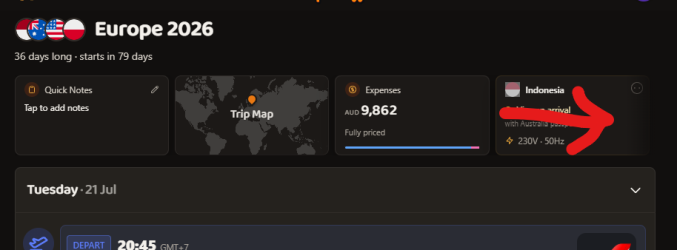
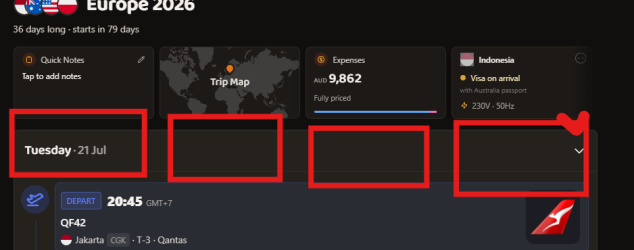
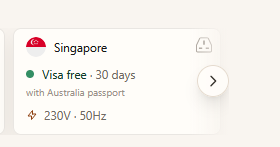
I see a common theme that the layout is not as condensed as it could be, so here's my suggestion, for each trip why not use the space in that first line? and only wrap if the user reduces screen width:
Thank you- it's a legitimate point on desktop.

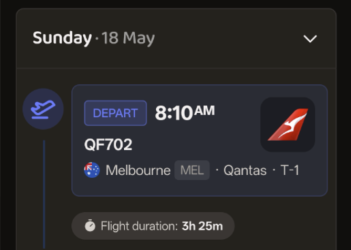
Looking at rough stats now, ~70% of views are on mobile devices, which have a screen width more akin to...
Screenshot 2026-05-01 at 10.38.04 am.png

There's still plenty of levers we can adjust though to use space more efficiently.
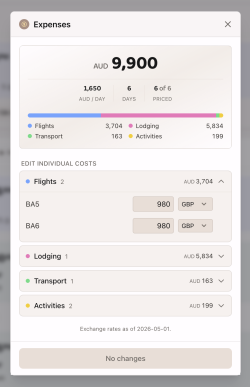
 
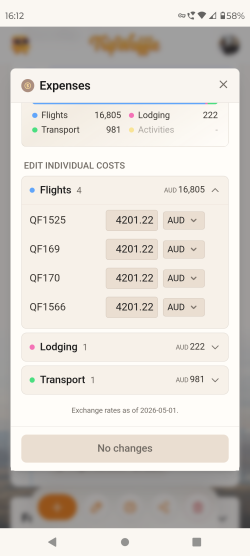
It's adding the total flight cost for each flight, so 4 times what it is in this example
 

Attachments

  • Screenshot_20260501-161232.png
    Screenshot_20260501-161232.png
    413.9 KB · Views: 3
Read our AFF credit card guides and start earning more points now.

AFF Supporters can remove this and all advertisements

Trip expenses v1 just dropped.
Widget above the trip timeline will result in...

Quick fix: multi-leg bookings will only apply the total pricing to the first leg now.

That's fantastic, looking really good. My savings account is crying in the corner now though. :p
Just on the multi-leg bookings, it's displaying the correct total price, but having a leg with a zero value is causing a "1 TO ADD" highlight to appear incorrectly given that the complete cost is already included.

Thinking to display details for the next event in your itinerary?
Yes, for the widget displaying the info for the next event, perhaps with an option countdown would be great. To give some examples:
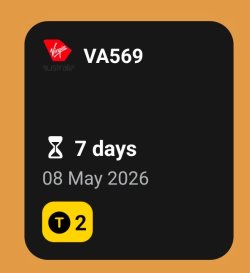
ByAir Widget.jpeg
This the small widget from byAir on Android, which is an app that just handles flights. The gate also gets added to the widget, next to the terminal number at the bottom, once that info becomes available. I quite like this widget as it just displays key info at a glance. I do wish it had the option to display hours as well as days in the countdown and the actual departure time as well. byAir also has a larger widget with more info displayed. Tapping the widget takes you straight to that flight's details.
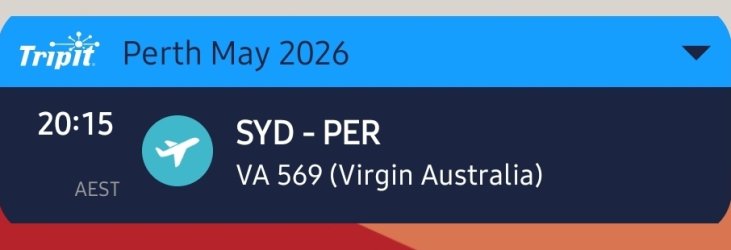
TripIt Small.jpg
This is the small TripIt on Android widget, which is actually better than I remember it being. The little drop down arrow in the upper right corner lets you move to the next event and then an up arrow appears as well. The obvious missing detail is the date or any other indication of how long until the event or the trip. TripIt also has a larger widget that displays several events in an agenda style. I think that widget is a pointless, you could just use a calendar agenda widget set to display just the TripIt calendar instead and it would achieve the same. The larger widget does display the date in a thin bar above each event. Tapping the event takes you straight to the event details in TripIt.

Just a few things to think over, I'm sure others will have examples and ideas of widgets as well.
 
Came across this thread just yesterday, and have been amazed by the level of engagement, response and development that has gone on in such a short space of time! Big kudos to @tripwaffle for joining the community and running what has become a live service desk and product improvement project ever since!

I’ve been a TripIt PRO subscriber for over a decade, and one of the main benefits for me back when I started using it was the Points Tracker, which helped to keep current account numbers, status tiers and points balances in a single view. Over time and as more logins moved to 2FA/MFA or required other challenges to get through, the ability to rely on what it could access and display has been greatly diminished, to the point I don’t bother with that anymore. Taking that feature away - tripwaffle is looking like a very solid competitor for the remaining feature set; or at least what I care about.

I was able to easily figure out the import process using Firefox and brought across over 100 itineraries from TripIt to tripwaffle last night. Took a while for it to scrape the data, but I could see what it was doing and what data was pulled, and I was fine with that. Now available in the app, my past and present trips look good, and the navigation in and around them quite intuitive.

Looking forward to further improvements as it grows, and maybe even a free pass (assuming it goes commercial at some point) for the AFF community of experts who may have helped it to do that! 🤓

Cheers,
Matt.
 
Looking forward to further improvements as it grows, and maybe even a free pass (assuming it goes commercial at some point) for the AFF community of experts who may have helped it to do that! 🤓
Thanks so much for the kind words - although its been a pretty fun journey so far with such an engaged/generous group of early users.

As stated elsewhere; no plans for commercialisation at this stage (need to get beyond "build good product" and "scale up" before it's even a conversation). Will definitely remember those who helped guide the product if it ever gets to that point though!
 
Being able to access an itinerary “off line” is now on my wish list. Tested this morning onboard a flight without wifi and could see today’s itinerary in Tripit but TW comes up with error message - you need to be online.
 
Being able to access an itinerary “off line” is now on my wish list. Tested this morning onboard a flight without wifi and could see today’s itinerary in Tripit but TW comes up with error message - you need to be online.
Working on it. "Print itinerary -> save pdf" is a functional/lesser substitute for now.
Thanks for communicating this as a priority though.
 
Mini update: now automatically displaying your accommodation breakfast status.
We've backfilled existing bookings (where confident) but this will mostly work with the processing of new bookings going forward.

View attachment 505192

Ha. That just helped me identify a mistake in a booking I made. Thought I had included breakfast in a booking I just made. Imported it to TW, but no breakfast icon. Hmmmm ... "Doesn't work ..."

Incorrect - I checked and found that I forgot to choose the breakfast option :rolleyes: 🤣 .
 
Ha. That just helped me identify a mistake in a booking I made. Thought I had included breakfast in a booking I just made. Imported it to TW, but no breakfast icon. Hmmmm ... "Doesn't work ..."

Incorrect - I checked and found that I forgot to choose the breakfast option :rolleyes: 🤣 .
In waffle we trust*

*not a guarantee, conditions apply
 

Become an AFF member!

Join Australian Frequent Flyer (AFF) for free and unlock insider tips, exclusive deals, and global meetups with 65,000+ frequent flyers.

AFF members can also access our Frequent Flyer Training courses, and upgrade to Fast-track your way to expert traveller status and unlock even more exclusive discounts!

AFF forum abbreviations

Wondering about Y, J or any of the other abbreviations used on our forum?

Check out our guide to common AFF acronyms & abbreviations.
Back
Top