Alternative to TripIt = TripWaffle

@tripwaffle I've logged this via "get help" but as that can't accommodate screenshots or files <hint hint> here's some additional info on the FR24 import issue I've encountered.

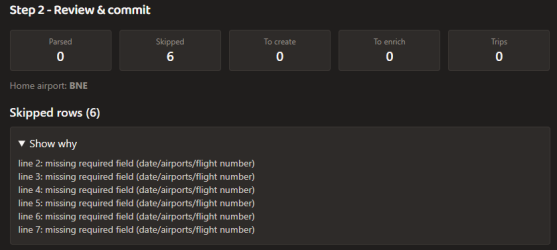
To keep it simple I tried a dataset of six flights which returned this:

1777284833958.png

This was the raw data from the csv with date/airports/flight number included:

1777285051461.png
 
@tripwaffle I've logged this via "get help" but as that can't accommodate screenshots or files <hint hint> here's some additional info on the FR24 import issue I've encountered.

To keep it simple I tried a dataset of six flights which returned this:

View attachment 504642

This was the raw data from the csv with date/airports/flight number included:

View attachment 504643
Someone else reported this issue too and I'm waiting on a data sample to be sent to tripwaffle AT fastmail DOT com if you feel like obliging. The single csv file we have to work with is functional, but we clearly need a broader sample. Many thanks.
 
I've also sent to the email an Openflights.org CSV files which I assume will be similar processing and import to myFR24.

Others might have flightmemory files.

For a while this forum hosted an instance of I think open flights but it was deprecated some time back.
 
Someone else reported this issue too and I'm waiting on a data sample to be sent to tripwaffle AT fastmail DOT com if you feel like obliging. The single csv file we have to work with is functional, but we clearly need a broader sample. Many thanks.
Sure, how many lines of data?

Edit: also looks like it's having trouble picking up airlines and flights.

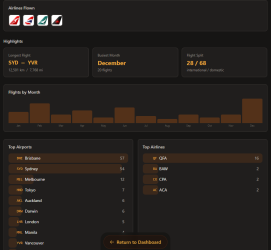
I've just added some historic trips from Tripit including MH, AY among others and it hasn't picked up the tails and while thr total number of flights went up, the airline list was unchanged:

1777287009120.png
 
Last edited:
Sure, how many lines of data?
As many as you're comfortable sharing, but I think we could make do with just a few lines though, as I suspect it's a matter of how the columns are labelled/ordered. Appreciate your help 🙇
Edit: also looks like it's having trouble picking up airlines and flights.
I've just added some historic trips from Tripit including MH, AY among others and it hasn't picked up the tails and while thr total number of flights went up, the airline list was unchanged:
Looking into this now. Apologies for the hassles; we have a bit of a special path for historical flight imports as we don't want them burning through a bunch of API lookup credits at our end. That said, we should certainly be determining the basics like airline. Please hold.
 
Read our AFF credit card guides and start earning more points now.

AFF Supporters can remove this and all advertisements

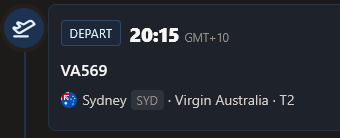
Think I might have spotted a bug in the calendar feed. Flights are showing with an incomplete flight number, just the airline code appears.
1777338724490.png
Whereas it should read
✈️ Virgin Australia VA569 SYD → PER

It's appearing with all the correct details in the web interface.
1777338812065.png
 
@Captain Halliday @HeavyElectricity

the flightradar importer should work for you now. Problem was that the date format, contained in the csv exports, varies based on the user's preference e.g.

'YYYY-MM-DD' ISO
'DD/MM/YYYY' AU / EU
'MM/DD/YYYY' US
There's an app I work with that spits out it's data in Unix Epoch dates down to milliseconds...yikes did that take sometime to figure out!
 
Think I might have spotted a bug in the calendar feed. Flights are showing with an incomplete flight number, just the airline code appears.
Well spotted thank you. Now fixed, and should be evident the next time your calendar client syncs its data with TW.
Bonus fixes: car rental and car parking now show as start/end events in the calendar vs one continuous event.
 
Well spotted thank you. Now fixed, and should be evident the next time your calendar client syncs its data with TW.
Bonus fixes: car rental and car parking now show as start/end events in the calendar vs one continuous event.
Thanks, that's great, can definitely see in Outlook that it's all fixed up now. :)
 
Question, where does this info show in the App? I've only loaded up 1 trip so far but can't see any of this info. Thanks.
Sorry- I should have disclosed this:
  • displays in widgets at top of trip timeline
  • when trip is in future and hasn't started yet
  • country list built from trip's events that aren't layovers
  • user's passport country is set (preferences and also widget when not set)
 
Sorry- I should have disclosed this:
  • displays in widgets at top of trip timeline
  • when trip is in future and hasn't started yet
  • country list built from trip's events that aren't layovers
  • user's passport country is set (preferences and also widget when not set)
Would you believe I didn't realise you could scroll sideways? I thought it was just Quick Notes and Trip Map, and only playing around now did I see you can swipe and there is plenty more info. Thanks for responding!

Some good features, and love your responsiveness. Like a few others, I'm finding the layout a bit ... "busy" for my liking. Would be good if you had a toggle where you could flip between a simple/expanded layout, and the simple could be more like the printed itinerary / like Tripit's clean and compact look.

Apart from that, the only thing I think that would be good would be some way to instead of having links to websites (like the airlines and hotels) it would link to their Apps, so I could launch the app from within the trip itinerary. Not sure if that is possible.
 
Some good features, and love your responsiveness. Like a few others, I'm finding the layout a bit ... "busy" for my liking. Would be good if you had a toggle where you could flip between a simple/expanded layout, and the simple could be more like the printed itinerary / like Tripit's clean and compact look.
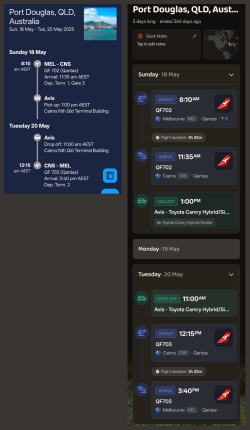
Certainly open to this concept, and its been pinned for follow-up. I thought it would be interesting to see the two side by side for the same trip, as a point of reference...

comp.png


Apart from that, the only thing I think that would be good would be some way to instead of having links to websites (like the airlines and hotels) it would link to their Apps, so I could launch the app from within the trip itinerary. Not sure if that is possible.
Solid suggestion: let me research further.
 
Certainly open to this concept, and its been pinned for follow-up. I thought it would be interesting to see the two side by side for the same trip, as a point of reference...

View attachment 504871


Solid suggestion: let me research further.
Yeah, I'm definitely gonna have to repeat myself a bit from an earlier post: the TW layout is much too busy and fails to prioritise core information (location!) - I acknowledge that Tripit fails on the prioritisation side, but is more legible in general.

The TW airline tails are cute but not at the expense of all the other stuff getting shrunk to tinyness and low-legibility, sorry.

And I still think a flight's dep/arr boxes should not be separate.
 
Yeah, I'm definitely gonna have to repeat myself a bit from an earlier post: the TW layout is much too busy and fails to prioritise core information (location!) - I acknowledge that Tripit fails on the prioritisation side, but is more legible in general.

The TW airline tails are cute but not at the expense of all the other stuff getting shrunk to tinyness and low-legibility, sorry.

And I still think a flight's dep/arr boxes should not be separate.
Appreciate that perspective thanks 👍
 

Become an AFF member!

Join Australian Frequent Flyer (AFF) for free and unlock insider tips, exclusive deals, and global meetups with 65,000+ frequent flyers.

AFF members can also access our Frequent Flyer Training courses, and upgrade to Fast-track your way to expert traveller status and unlock even more exclusive discounts!

AFF forum abbreviations

Wondering about Y, J or any of the other abbreviations used on our forum?

Check out our guide to common AFF acronyms & abbreviations.
Back
Top