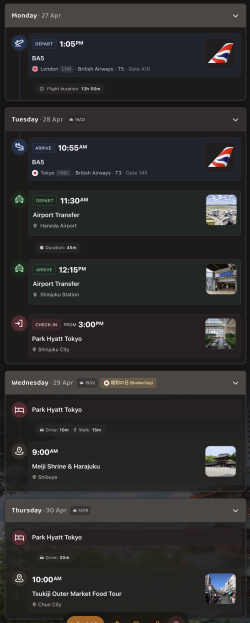
Alternative to TripIt = TripWaffle

Travelling with tripwaffle right now. Simple itinerary with QF flights and booking.con accomodation. So far so good. I have had heaps of trouble over the past two years with random booking.com imports failing with tripit and my support tickets just going stale.

Once my trip ends I will do an export of tripit.

Thanks for the effort on this
 
Seems to have been the case ... I'll try with another complex itinerary.
Received the email for successful upload (15 events) but it would not auto update (updating animation did not show). After waiting a few minutes, Shift+F5 did the trick.

I have been using Win 11 - I have not downloaded any app as yet.
 
@tripwaffle - one thing is a bit funny - when I edit an entry (to add additional info not automatically picked up for what ever reason) not all fields are shown; e.g. booking channel, airline seats, departure / arrival time for manually added flights
Just fixed this to allow editing of flight times.
One thing to be aware of: your flight times will be automatically overridden by the live scheduling data we monitor from airlines.
Thanks for reporting!
 
Not sure how easy this will be to address generally.
But I noted some airline logos that I didn't recognise on some historical imported trips.

From the web login I was able to open the PNG file to see what was going on. A lot is former airline codes that have now been re-issued.

DJI.png - Air Djibouti, which I suspect corresponds to flights with the DJ/VOZ code flown by Virgin Blue from 2000-2013.

TTZ.png - Transair flight equipment. TT/TTG used by TigerAir Australia from 2007-2020.

NAX.png - Think this was an NA flight by the former Norwegian Air Shuttle. Think the pic used is one of their tails rather than a generalised logo.

SLK.png - MI/SLK correctly identified as Silk Air but it's not a logo I'm familiar with before SQ shut operations. The Blue/green logo on Wikipedia is what I recall

RDN.png - Dinar airlines (D7/RDN). The opposite scenario this time. This airline ceased operating in 2002 and the current user of the D7 code is Air Asia X. (D7/XAX 2007-now)
 
Last edited:
Not sure how easy this will be to address generally.
But I noted some airline logos that I didn't recognise on some historical imported trips.

From the web login I was able to open the PNG file to see what was going on. A lot is former airline codes that have now been re-issued.

DJI.png - Air Djibouti, which I suspect corresponds to flights with the DJ code flown by Virgin Blue from 2000-2013.

TTZ.png - Transair flight equipment. TT/TTG used by TigerAir Australia from 2007-2020.

NAX.png - Think this was an NA flight by the former Norwegian Air Shuttle. Think the pic used is one of their tails rather than a generalised logo.

SLK.png - MI/SLK correctly identified as Silk Air but it's not a logo I'm familiar with before SQ shut operations. The Blue/green logo on Wikipedia is what I recall

RDN.png - Dinar airlines (D7/RDN). The opposite scenario this time. This airline ceased operating in 2002 and the current user of the D7 code is Air Asia X. (D7/XAX 2007-now)
Awesome thanks - it's hard to find any sort of ground truth on these things. Open to me sending you a full list you can easily scan and flag anything unusual?
 
Once a trip is open it displays all days between departure and arrival. Days with activities (flights etc) are expanded - however idle days are listed numerically.

Is there a way to hide days where this is no activity? Possibly a setting to enable/disable this?
 
Open to me sending you a full list you can easily scan and flag anything unusual?
Happy to take a look but others on this forum probably with more knowledge.. and you might need to look elsewhere for other markets.

Other relatively sizeable historic Aus codes at least into the 1990s
AN/AAA - Ansett Australia - 1930s - 2002
KD/KDA - Kendell Airlines - 1967 - 2002
ZL/HZL - Hazelton Airlines 1950s - 2002
AO/AUZ - Australian Airlines - 2002 to 2006
AB/BNZ - Bonza - 2023 to 2024
FQ/BRI - Brindabella Airlines - 1994 to 2013
YM/CYM - Compass Airlines - 1990 to 1993
EW/EWA - East-West Airlines - 1947 to 1993
VQ/IPU - Impulse Airlines - 1992 to 2004
JG/JGO - JetGo - 2011 to 2018
O7/OZJ - OzJet - 2007 to 2012
XR/OZW - Skywest Airlines - 1980 to 2013
VC/AGC - Air Australia - 2008 to 2012*
TT/TGG - TigerAir Australia - 2007 to 2020
TN/TAA - Australian Airlines (TAA) - 1946 to 1994
VA/VAU - V Australia - 2009 to 2011
DJ/VOZ - Virgin Blue - 2000 to 2011

Others serving/ related Australia
TR/TGW - TigerAir - 2003 to 2017
3K/JSA - Jetstar Asia - 2004 to 2024
VF/VLU - ValuAir - 2004 to 2024
SJ/FOM - Freedom Air - 1995 to 2008
ZJ/VVM - Viva Macau - 2005 to 2010

Others I've caught
ZB/MON - Monarch Airlines - 1967 to 2017

This Wikipedia page used for much of the Aus codes

(And noting that much of the apps focus is on future not historical flights)

 
Received the email for successful upload (15 events) but it would not auto update (updating animation did not show). After waiting a few minutes, Shift+F5 did the trick.

I have been using Win 11 - I have not downloaded any app as yet.
Cheers for reporting your experience - we've improved the trip auto-refresh logic to better show changes, when it's needed, for scenarios like this.
 
Happy to take a look but others on this forum probably with more knowledge.. and you might need to look elsewhere for other markets.

Other relatively sizeable historic Aus codes at least into the 1990s
AN/AAA - Ansett Australia - 1930s - 2002
KD/KDA - Kendell Airlines - 1967 - 2002
ZL/HZL - Hazelton Airlines 1950s - 2002
AO/AUZ - Australian Airlines - 2002 to 2006
AB/BNZ - Bonza - 2023 to 2024
FQ/BRI - Brindabella Airlines - 1994 to 2013
YM/CYM - Compass Airlines - 1990 to 1993
EW/EWA - East-West Airlines - 1947 to 1993
VQ/IPU - Impulse Airlines - 1992 to 2004
JG/JGO - JetGo - 2011 to 2018
O7/OZJ - OzJet - 2007 to 2012
XR/OZW - Skywest Airlines - 1980 to 2013
VC/AGC - Air Australia - 2008 to 2012*
TT/TGG - TigerAir Australia - 2007 to 2020
TN/TAA - Australian Airlines (TAA) - 1946 to 1994
VA/VAU - V Australia - 2009 to 2011
DJ/VOZ - Virgin Blue - 2000 to 2011

Others serving/ related Australia
TR/TGW - TigerAir - 2003 to 2017
3K/JSA - Jetstar Asia - 2004 to 2024
VF/VLU - ValuAir - 2004 to 2024
SJ/FOM - Freedom Air - 1995 to 2008
ZJ/VVM - Viva Macau - 2005 to 2010

Others I've caught
ZB/MON - Monarch Airlines - 1967 to 2017

This Wikipedia page used for much of the Aus codes

(And noting that much of the apps focus is on future not historical flights)

May live to regret this, but we whipped up this quick page that allows anyone to review, and add comments to, our airline logos, that need improvement:


Grateful for any corrections we can crowd-source here. We'll follow up in a few days time by actioning the comments that have been left.
 
At the moment there doesn't seem to be any automatic flagging of overlapping bookings, but this would be great for people who have (deliberately or accidentally) created a conflicting schedule.

For instance, I have a flight with CI for late this year, but have a parallel schedule with SQ as a backup because of an antipated issue with CI. Similarly, some people will make a flexible hotel booking well in advance and then a cheaper non-flex close to travel, but might forget to cancel the flexible booking.
 
Once a trip is open it displays all days between departure and arrival. Days with activities (flights etc) are expanded - however idle days are listed numerically.

Is there a way to hide days where this is no activity? Possibly a setting to enable/disable this?
Easy win, so this is now shipped under Settings > Preferences. Much obliged!
 
At the moment there doesn't seem to be any automatic flagging of overlapping bookings, but this would be great for people who have (deliberately or accidentally) created a conflicting schedule.

For instance, I have a flight with CI for late this year, but have a parallel schedule with SQ as a backup because of an antipated issue with CI. Similarly, some people will make a flexible hotel booking well in advance and then a cheaper non-flex close to travel, but might forget to cancel the flexible booking.
Interesting one. How do you see this in practice? My quick thoughts:
1. Detect any event of the same type (flight, hotel, etc) with overlapping dates
2. Alert via a persistent notice on the dashboard?
 
Interesting one. How do you see this in practice? My quick thoughts:
1. Detect any event of the same type (flight, hotel, etc) with overlapping dates
2. Alert via a persistent notice on the dashboard?
Yeah, the visual presentation is something I was wondering about. For detection, yes, by event type seems the only simple way.

For flagging this: the problem with a persistent notice is that it might be annoying if the overlapping bookings are deliberate. I kinda think the basic responsibility for managing this should still remain with the user, but putting a visual flag on the events in the trip display timeline might be clean and sufficient (and/or a little flag on the affected trip box on the dashboard as well).

If you want to get superfancy wonderbuckets: Split the affected day(s) vertically into side-by-side overlapping events. :cool: :cool: :cool:
 
Yeah, the visual presentation is something I was wondering about. For detection, yes, by event type seems the only simple way.

For flagging this: the problem with a persistent notice is that it might be annoying if the overlapping bookings are deliberate. I kinda think the basic responsibility for managing this should still remain with the user, but putting a visual flag on the events in the trip display timeline might be clean and sufficient (and/or a little flag on the affected trip box on the dashboard as well).

If you want to get superfancy wonderbuckets: Split the affected day(s) vertically into side-by-side overlapping events. :cool: :cool: :cool:
Side-by-side is a neat idea but problematic on narrow mobile screens, and also doesn't cover overlap in seperate trips. Leave it with us though- we can at least flag it to the user somehow.
 
Side-by-side is a neat idea but problematic on narrow mobile screens, and also doesn't cover overlap in seperate trips. Leave it with us though- we can at least flag it to the user somehow.
An unrelated-but-related idea: I don't have any accom bookings to test out, but if it doesn't exist, from a visual perspective I think it's easier for people to see hotel and local event bookings if they are visually offset slightly (e.g. indented) relative to the umbrella details of outbound and inbound journeys, for instance. Of course you wouldn't want to nest too much, but at least:

FLIGHT OUT
| HOTEL BOOKING
| THEATRE
| EXCURSION
| [ ... ]
TRAIN ONWARD
| HOTEL BOOKING
| [...]
FLIGHT HOMEWARDS
 
Read our AFF credit card guides and start earning more points now.

AFF Supporters can remove this and all advertisements

Become an AFF member!

Join Australian Frequent Flyer (AFF) for free and unlock insider tips, exclusive deals, and global meetups with 65,000+ frequent flyers.

AFF members can also access our Frequent Flyer Training courses, and upgrade to Fast-track your way to expert traveller status and unlock even more exclusive discounts!

AFF forum abbreviations

Wondering about Y, J or any of the other abbreviations used on our forum?

Check out our guide to common AFF acronyms & abbreviations.
Back
Top