Alternative to TripIt = TripWaffle

Not yet ready to forward previous trips (from Tripit) which date back to 2014 I think ;)
I pulled all mine from as far back as 2010, it took a few mins and I had to follow the instructions on how to run a script in the browser console (happy to show anyone else how to do this if it helps), but was quite straightforward, and all the stats just appeared!

@tripwaffle One minor issue I've noted when viewing past data:

There doesn't appear to be a way to scroll past the last year "2015" shown in the scroll bar. I couldn't click and drag these, and clicking on "2015" didn't automatically scroll this to centre or such - to view years earlier than 2015.

1776472159165.png
 
Not yet ready to forward previous trips (from Tripit) which date back to 2014 I think ;)
Amateur! My start around 1992. Some entries reconstructed from parchment I found lying around….😂.

Although TripIt doesn’t like old entries for airlines that don’t exist anymore or worse, another airline has reused the old code!
 
FWIW, one of the reasons the calendar sync is important to me - we use booking systems that offer availability to setup meetings based on calendar availability. Using apps like this ensure that those periods of flights are marked automatically as "Unavailable". Adding the buffers before and after flights is a feature that TripIt never had.
 
FWIW, one of the reasons the calendar sync is important to me - we use booking systems that offer availability to setup meetings based on calendar availability. Using apps like this ensure that those periods of flights are marked automatically as "Unavailable". Adding the buffers before and after flights is a feature that TripIt never had.
Problem solved! 😉
 
I pulled all mine from as far back as 2010, it took a few mins and I had to follow the instructions on how to run a script in the browser console (happy to show anyone else how to do this if it helps), but was quite straightforward, and all the stats just appeared!

@tripwaffle One minor issue I've noted when viewing past data:

There doesn't appear to be a way to scroll past the last year "2015" shown in the scroll bar. I couldn't click and drag these, and clicking on "2015" didn't automatically scroll this to centre or such - to view years earlier than 2015.
View attachment 503962

Thanks for giving this a sound thrashing 😉 ... that interface is now fixed to wrap properly on desktop.
 
Problem solved! 😉
Not for me. Long haul flights are an sanctuary for me, I'm happy to do work if I am in a premium cabin or fortunate enough to have an empty seat next to me, but no way I'm taking meetings etc. I've actually found flights to be highly productive WITHOUT internet access.
 
Have downloaded app and will forward future trips to see how it works.

Not yet ready to forward previous trips (from Tripit) which date back to 2014 I think ;)
Ok have imported all my future trips...will play around to see if it is worthwhile to import all my previous trips!
 
Ok have imported all my future trips...will play around to see if it is worthwhile to import all my previous trips!
After a bit of pffaffing around, I managed to import all my old trips from Tripit (only started using it in 2014) and all the trips came across bar the first 2 trips...not sure why so I just manually TFd those 2 trips. :)

I suggested they add an option to have a display with a light (instead of black) background with dark font on it, and already got a reply they will add that to the next update :)
 
@tripwaffle On Android it seems there is no way to select which push notifications to receive. There was options for emails though. That would be a nice feature to add.

Look forward to seeing how it goes for my upcoming trip on Monday.
 
Good point thanks. I'll add it as a todo.

Another feature to add is at the moment you can share a trip as either view only or can edit. Needs a third option where the person you're sharing it with also a traveller. So when they view the trip it shows as such too.
 
Another feature to add is at the moment you can share a trip as either view only or can edit. Needs a third option where the person you're sharing it with also a traveller. So when they view the trip it shows as such too.

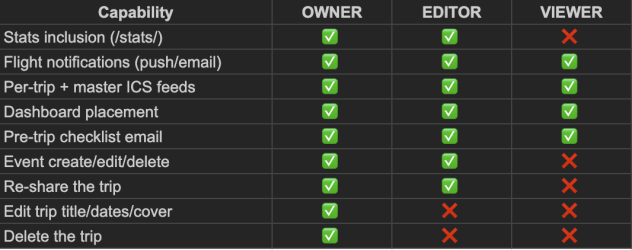
To clarify the existing roles, I made this little chart. Please let me know if this doesn't align with your expectations on how things work. Cheers.

Screenshot 2026-04-18 at 3.14.32 pm.png
 
To clarify the existing roles, I made this little chart. Please let me know if this doesn't align with your expectations on how things work. Cheers.

View attachment 503970

I think you need to differentiate between editor and (second) traveller. Eg, someone makes their assistant an editor, they wouldn't want their bosses stats showing as theirs.
 
Is it an alternative for TripIt ( per the OP) or Flighty? For instance does it handle hotel bookings, rail, concerts, other activities, with inputs for things like cost, confirmation, like TripIt? Does it produce a visual timeline so you can see possible overlapping or conflicting events of different types?
 
Last edited:
Is it an alternative for TripIt ( per the OP) or Flighty? For instance does it handle hotel bookings, rail, concerts, other activities, with inputs for things like cost, confirmation, like TripIt? Does it produce a visual timeline so you can see possible overlapping or conflicting events of different types?

In short, yes. I'm obviously biased, but objectively, it does everything tripit does plus a whole lot more.
Key point of differentiation: tripit will only process booking emails from certain vendors. Tripwaffle will literally process any confirmation from any provider- think of the most obscure ferry operator or Alaskan dog sled tour... we'll import it into your itinerary.

On top of that, we have pretty decent flight tracking/alerts, which we're continually improving speed and coverage for.
 
Read our AFF credit card guides and start earning more points now.

AFF Supporters can remove this and all advertisements

So the issue I have is that you need to use apple or google to log in on a pc.

I would prefer not to have it associated with either account and just create an account with an outlook email
 

Become an AFF member!

Join Australian Frequent Flyer (AFF) for free and unlock insider tips, exclusive deals, and global meetups with 65,000+ frequent flyers.

AFF members can also access our Frequent Flyer Training courses, and upgrade to Fast-track your way to expert traveller status and unlock even more exclusive discounts!

AFF forum abbreviations

Wondering about Y, J or any of the other abbreviations used on our forum?

Check out our guide to common AFF acronyms & abbreviations.

Recent Posts

Back
Top