




You are using an out of date browser. It may not display this or other websites correctly.
You should upgrade or use an alternative browser.
You should upgrade or use an alternative browser.
Alternative to TripIt = TripWaffle
- Thread starter SeatBackForward
- Start date


- Joined
- Mar 14, 2026
- Posts
- 339
Done- button at the bottom of the preferences panelPossibly a ‘Find Waffle parties’ function somewhere to flag what matches occur?


- Joined
- Mar 14, 2026
- Posts
- 339
Apologies - this is looking like a silent failure with our email sending provider. Chasing it now.I can't log back into my account because the verification code does not arrive in my email inbox. Yes I have checked my spam folder
- Joined
- Mar 14, 2026
- Posts
- 339
You should be good now. Our outbound email provider is still down, but we've wired in automatic fallback to a secondary provider for when this happens nowI can't log back into my account because the verification code does not arrive in my email inbox. Yes I have checked my spam folder


SeatBackForward
Senior Member
- Joined
- Jun 20, 2006
- Posts
- 5,904
- Qantas
- LT Gold
- Oneworld
- Emerald
Got to say, this waffle party thing is very cool 
- Joined
- Mar 14, 2026
- Posts
- 339
Got to say, this waffle party thing is very cool
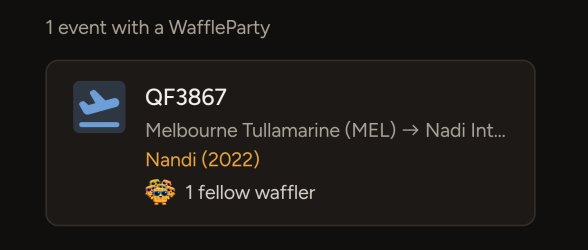
Sadly I've only got the one hit personally (*so far*)

- Joined
- Nov 12, 2012
- Posts
- 33,321
- Qantas
- Platinum
- Virgin
- Gold
- Star Alliance
- Gold
Sadly I've only got the one hit personally (*so far*)
You need to come to an AFF dinner/event. 28 for me, incl 5 coming up.
SeatBackForward
Senior Member
- Joined
- Jun 20, 2006
- Posts
- 5,904
- Qantas
- LT Gold
- Oneworld
- Emerald
I've got one for a visit to Orlando back in 2014. Really curious how accurate this is!
- Joined
- Mar 14, 2026
- Posts
- 339
I looked this up and it's a false alert apologies - we were matching transport events purely on title. Now adding a rule they must be within geographical proximity, as per existing rule on accom events.I've got one for a visit to Orlando back in 2014. Really curious how accurate this is!
I'll give all the logic another look now.

- Joined
- Dec 31, 2011
- Posts
- 12,863
- Qantas
- Platinum
- Virgin
- Red
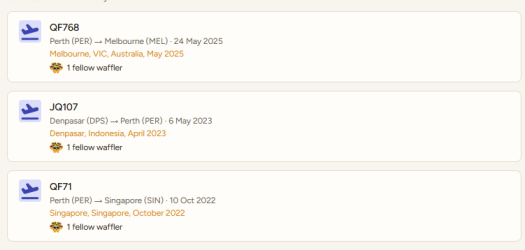
Turns out I've had some parties that I've been unaware of
- Joined
- Mar 14, 2026
- Posts
- 339
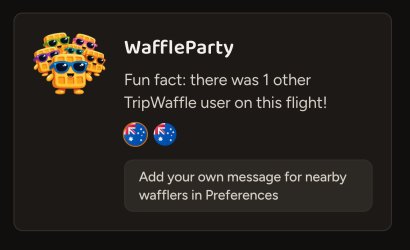
Ok it should all be pretty solid now. Added home flags for added intrigue too...

- Joined
- Nov 16, 2004
- Posts
- 50,059
- Qantas
- Platinum
- Virgin
- Platinum
- Oneworld
- Emerald
I had an big mismatch this morning messing up my trips extensively. Due to the way I book thing I already have to do extensive manual re-allocation and this means further work,
I have a multi segment ATW booking started in February with travel BNE-KUL via New Zealand (4 segments). It then has a break until August with KUL to HKG, HKG to DFW (3 segments) and in September DFW to BNE (2 segments). There are separately booked nested trips, MEL-BNE, KUL-MEL, MEL-WLG-MEL, MEL-KUL, DFW-SEA-DFW and BNE-MEL.
There was a schedule change with the DFW flights in the main booking and a new ticket was issued and emailed. This eticket contained all flights going back to February. I knew I would have to move all the August September travel to a different trip. However, after forwarding to trip waffle, the trip has had all the February flights moved to 2027.
I now have to go in and manually update the dates in each of these flights back to this year - the trip may have lost any added real time data.
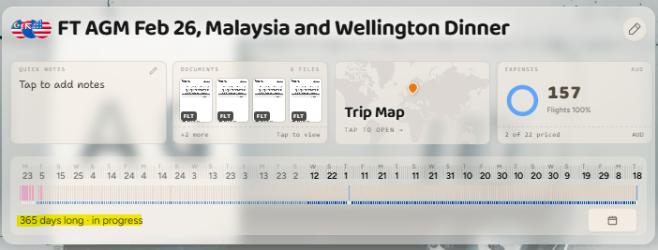
I have a multi segment ATW booking started in February with travel BNE-KUL via New Zealand (4 segments). It then has a break until August with KUL to HKG, HKG to DFW (3 segments) and in September DFW to BNE (2 segments). There are separately booked nested trips, MEL-BNE, KUL-MEL, MEL-WLG-MEL, MEL-KUL, DFW-SEA-DFW and BNE-MEL.
There was a schedule change with the DFW flights in the main booking and a new ticket was issued and emailed. This eticket contained all flights going back to February. I knew I would have to move all the August September travel to a different trip. However, after forwarding to trip waffle, the trip has had all the February flights moved to 2027.
I now have to go in and manually update the dates in each of these flights back to this year - the trip may have lost any added real time data.
- Joined
- Mar 14, 2026
- Posts
- 339
Happy to work through this with you- we can always restore trips from backups if necessary.I had an big mismatch this morning messing up my trips extensively. Due to the way I book thing I already have to do extensive manual re-allocation and this means further work,
I have a multi segment ATW booking started in February with travel BNE-KUL via New Zealand (4 segments). It than has a break until August with KUL to HKG, HKG to DFW (3 segments) and in September DFW to BNE (2 segments). There are separately booked nested trips, MEL-BNE, KUL-MEL, MEL-WLG-MEL, MEL-KUL, DFW-SEA-DFW and BNE-MEL.
There was a schedule change with the DFW flights in the main booking and a new ticket was issued and emailed. This eticket contained all flights going back to February. I knew I would have to move all the August September travel to a different trip. However, after forwarding to trip waffle, the trip has had all the February flights moved to 2027.
I now have to go in and manually update the dates in each of these flights back to this year - the trip may have lost any added real time data.
View attachment 518004
Probably best to contact via the app support channel though, so that we can talk specifics of your trip.

- Joined
- Nov 12, 2012
- Posts
- 33,321
- Qantas
- Platinum
- Virgin
- Gold
- Star Alliance
- Gold
Is there a way to merge trips that have been separated? I've got a 2 week gap where I haven't booked things yet so it's showing as 2 different trips.
Hit 'Reorganise'
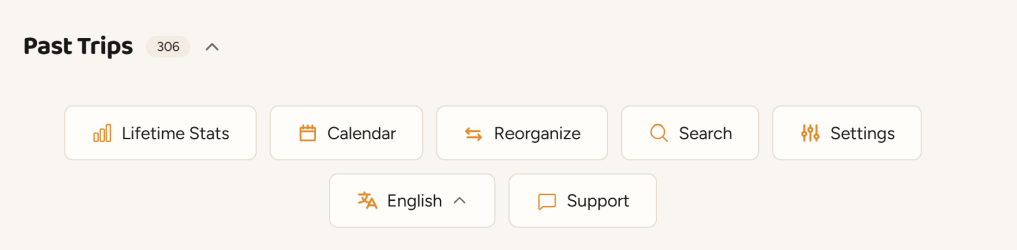
Pull up the trips involved (search for them as they presently exist and they'll appear beneath the search box). The ones you'll find there now will probably be your upcoming ones. They'll get displaced by the ones you just brought in.
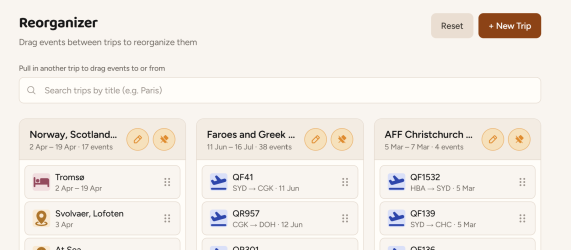
Drag the events of one and drop into the other. If they fall out of order, you can grab them using the 6 dot thing and re-organise within a trip. Delete the now empty trip.
I've sometimes had to create a new trip to properly populate a trip that got fragmented from old trip data.
- Joined
- Mar 14, 2026
- Posts
- 339
I'll add one more point to the above (excellent) response: we always welcome reports of miscategorising as we can than improve the underlying logic for everyone.
Best via in-app support form as it includes the account and trip details for easy reference.
Best via in-app support form as it includes the account and trip details for easy reference.

Read our AFF credit card guides and start earning more points now.
AFF Supporters can remove this and all advertisements

- Joined
- Jan 13, 2010
- Posts
- 701
- Qantas
- Platinum
- Oneworld
- Emerald
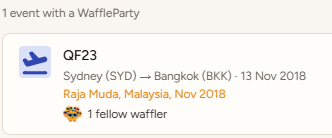
Just tried out the new WaffleParty feature ... hopefully lots more "hits" ongoing!

- Joined
- Feb 19, 2009
- Posts
- 4,050
- Qantas
- Platinum
- Oneworld
- Emerald
- Star Alliance
- Gold
How do you find a waffleparty on individual flights? Are these treated as events as well?



Become an AFF member!
Join Australian Frequent Flyer (AFF) for free and unlock insider tips, exclusive deals, and global meetups with 65,000+ frequent flyers.AFF members can also access our Frequent Flyer Training courses, and upgrade to Fast-track your way to expert traveller status and unlock even more exclusive discounts!
AFF forum abbreviations
Wondering about Y, J or any of the other abbreviations used on our forum?Check out our guide to common AFF acronyms & abbreviations.


Currently Active Users
- Happy Trails
- swellington
- Happy Dude
- JohnM
- heycam
- Harrison_133
- Warks
- albyd
- jamdav93
- tgh
- Dmac59
- kiwipino
- asterix
- Human
- redwoodw
- DC-Treks
- offshore171
- Kristmas
- leadman
- skflyer
- MELso
- dh3mike
- vbroucek
- Macdonald2
- SYD
- gtrod
- vhojm
- SydneySwan
- Vekor
- moa999
- AppleJune
- BriarFlyer
- deka2
- HealthyPotato
- MEL_Traveller
- mjt57
- PP075
- Triben
- Doug_Westcott
- antycbr
- JayTee
- sihyonkim
- Black Duck
- otchi
- markis10
- dairyfloss
- Spamam
Total: 1,884 (members: 56, guests: 1,828)