



Alternative to TripIt = TripWaffle

Not a biggie, but the categories of QF FF status don't include Lifetime categories. (I'm settled at LTG.)

Vaccination information seems more tricky to integrate and cross-check vaccination status with requirements for different countries (if that was the hope or intention.)

It seems to be a quirk of the Immunisation History Statement under MyGOV Health Record, but opening my 2-page record dating back to 2005 only opens vaccinations back to 2018. Selecting Download only dumps the shortened .pdf. My Yellow Fever (lifelong) is the 2005 record, so doesn't appear.

Aahh - I notice that it only downloads records where there is a listing in the 'Disease' column. Prior to 2018, there are no listings in that column, only in the 'Vaccine Details' column. That is obviously too cryptic on its own.

If I highlight the full list and copy/paste it into a Word document, save that as a .pdf and upload it to my TW Wallet in the Vaccination category, it's there as a 3-page document - but the 'Scroll' button at the bottom of page 1 does not function. (The download button top right functions.)
 
Not a biggie, but the categories of QF FF status don't include Lifetime categories. (I'm settled at LTG.)

Vaccination information seems more tricky to integrate and cross-check vaccination status with requirements for different countries (if that was the hope or intention.)

It seems to be a quirk of the Immunisation History Statement under MyGOV Health Record, but opening my 2-page record dating back to 2005 only opens vaccinations back to 2018. Selecting Download only dumps the shortened .pdf. My Yellow Fever (lifelong) is the 2005 record, so doesn't appear.

Aahh - I notice that it only downloads records where there is a listing in the 'Disease' column. Prior to 2018, there are no listings in that column, only in the 'Vaccine Details' column. That is obviously too cryptic on its own.

If I highlight the full list and copy/paste it into a Word document, save that as a .pdf and upload it to my TW Wallet in the Vaccination category, it's there as a 3-page document - but the 'Scroll' button at the bottom of page 1 does not function. (The download button top right functions.)
Lifetime status: Qantas Lifetime Silver, Lifetime Gold and Lifetime Platinum are now in the status list. You may need to manually edit your Qantas card from Gold over to Lifetime Gold.

Vaccinations: full integration is in the "too hard basket" at this point. Too much variation in the records and procedures for home countries and whether you're covered depends on age, doses, etc. Would rather not present guesses that our users are covered.

Scroll button: having trouble reproducing this one sorry. Website or app?

Good stuff though, keep 'em coming.
 
Lifetime status: Qantas Lifetime Silver, Lifetime Gold and Lifetime Platinum are now in the status list. You may need to manually edit your Qantas card from Gold over to Lifetime Gold.

Vaccinations: full integration is in the "too hard basket" at this point. Too much variation in the records and procedures for home countries and whether you're covered depends on age, doses, etc. Would rather not present guesses that our users are covered.

Scroll button: having trouble reproducing this one sorry. Website or app?

Good stuff though, keep 'em coming.

I figured full integration of vaccinations would be too hard.

Scrolling fail: website.
 
Elevate your business spending to first-class rewards! Sign up today with code AFF10 and process over $10,000 in business expenses within your first 30 days to unlock 10,000 Bonus PayRewards Points.
Join 30,000+ savvy business owners who:

✅ Pay suppliers who don’t accept Amex
✅ Max out credit card rewards—even on government payments
✅ Earn & transfer PayRewards Points to 10+ airline & hotel partners

Start earning today!
- Pay suppliers who don’t take Amex
- Max out credit card rewards—even on government payments
- Earn & Transfer PayRewards Points to 8+ top airline & hotel partners

AFF Supporters can remove this and all advertisements

I think where the vaccinations thing becomes a little confusing is here:

1795093462283.png

The radio buttons next to 'Vaccinations' will not turn green from the stored immunisation record, but that is what seems to be implied from the presentation.

It might be better to separate out 'Vaccinations' to be at the bottom as 'Vaccinations required:'or 'Vaccinations recommended:' and remove the radio button.

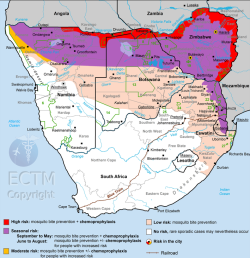
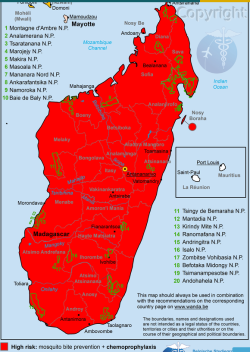
Malaria prophylaxis recommended may be worth adding if that can be scraped from country information - and allied with the itinerary for countries with malarial and non-malarial regions for even more detail.

Eg. South Afrca has no malaria risk in the south:

1795094210610.png

But Madagascar is high-risk everywhere:

1795094357282.png
 
I've improved the clarity of that vaccination line and malaria now has its own line and distinguishes between "tablets advised" (Madagascar, everywhere) and "tablets, some areas" (South Africa).

On ticking: the rings can't go green from user records, but can be manually ticked. New users now see "Tap to tick" on the card until they've ticked something off.

Ta!
 
I can't find the instructions to turn off the price of fares when sharing - can anyone help please?
 
Is it possible to handle events on board a cruise ship or ashore on a cruise better?

At present a port of call is in there from the time of arrival to the time of departure okay. It will handle a tour okay, departure to arrival back, also a lecture on board. For the latter, it will allow me to input ‘on board’ as the location in free text ( but somehow it now calls this east Windsor) but both sit outside the event of the port, whereas it would be better if they were nested. See my current trip for 20 November..

Perhaps if we could designate a cruise event as being ‘on board’ or ‘on shore’ it would help it to understand what’s going on better.

PS, this might be able to be adaptable for flights as well if you want to note something that’s being done or scheduled while on a flight.
 
Not really a priority but more of a would be nice to have, in the statistics section I have my longest flight, would it also be possible to have shortest flight as well as most northern, southern, eastern, and western airports?
 
Another little fiddly suggestion: in the travel heat-map, the "all time" table has the months as columns and the years as rows.
However the heat-map table for each year has the months as rows and the days as columns.
Could I suggest keeping it simple by always having the months as columns.
Then it would be easier to understand at a glance.
 
Is it possible to handle events on board a cruise ship or ashore on a cruise better?

At present a port of call is in there from the time of arrival to the time of departure okay. It will handle a tour okay, departure to arrival back, also a lecture on board. For the latter, it will allow me to input ‘on board’ as the location in free text ( but somehow it now calls this east Windsor) but both sit outside the event of the port, whereas it would be better if they were nested. See my current trip for 20 November..

Perhaps if we could designate a cruise event as being ‘on board’ or ‘on shore’ it would help it to understand what’s going on better.

PS, this might be able to be adaptable for flights as well if you want to note something that’s being done or scheduled while on a flight.
Good idea: when editing those events there's now an "On board the ship" switch. This will prevent it trying to resolve on a map and getting flagged as overlapping.

Events inside a port stop are now visually indented on the timeline too.

Edit: instead of indent, I might just do the port events as split cards that contain the other events. Bear with me pls.
 
Last edited:
Another little fiddly suggestion: in the travel heat-map, the "all time" table has the months as columns and the years as rows.
However the heat-map table for each year has the months as rows and the days as columns.
Could I suggest keeping it simple by always having the months as columns.
Then it would be easier to understand at a glance.
Done, thank you
 
View attachment 533066

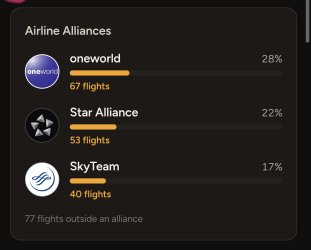
If any keen eyes / old hands want to check the logic we're determining alliances through (new feature), that would be much appreciated. Visible on flight pages and as an aggregate in the stats.
On it.
Initial assessment of summary data: TW reports 159 flights outside alliances, I can only identify 137.
Will dig deeper.
This is without taking time into account: for example I have counted flights on LATAM as outside an alliance even though it was a Oneworld member at the time of my flights.
JUst a note: it would be really easy to audit this if there were a field for alliance in the flight log.
 
Last edited:
On it.
Initial assessment of summary data: TW reports 159 flights outside alliances, I can only identify 137.
Will dig deeper.
This is without taking time into account: for example I have counted flights on LATAM as outside an alliance even though it was a Oneworld member at the time of my flights.
JUst a note: it would be really easy to audit this if there were a field for alliance in the flight log.
The aggregate "discrepancies" are due to historical factors: flights with missing info which were before the alliances existed anyway.
So not a Tripwaffle issue at all.
I have checked thoroughly and every airline seems to be properly attributed.
Tripwaffle has also done a good job with changing alliance membership: my flights with LATAM show it as a OW member.
I haven't flown with them since they left OW but maybe someone else has a data point for that.
Nice feature.
 
I found a cool new use for the TripWaffle MCP! I exported points activity from Qantas Business Rewards (CSV export) and Qantas - you can grab the transactions as JSON using a browser network inspector. I might add an export button to my Tampermonkey script.

Then using all three data sources, I got Claude to scan for missing points from flights and Qantas hotels stays and DSC credits. QBR point crediting is a bit unreliable in my experience and it found a few, and I also got it to fill out the claim spreadsheet.

It's another fun way to use the MCP to automate something that is rather tedious to do by hand!
 
An unexpected issue: yesterday I sent robot an email with an SNCF booking for trains Paris-Biganos return.
The booking is there but not all the info has been extracted. The departure and arrival points are missing and the trip doesn't show on the map.

I know I can go in and select those points manually from the drop-down list, but I didn't want to edit the trip until you had the chance to look at it to ascertain why the robot didn't extract all the info, as it has from previous SNCF booking emails.
 

Become an AFF member!

Join Australian Frequent Flyer (AFF) for free and unlock insider tips, exclusive deals, and global meetups with 65,000+ frequent flyers.

AFF members can also access our Frequent Flyer Training courses, and upgrade to Fast-track your way to expert traveller status and unlock even more exclusive discounts!

AFF forum abbreviations

Wondering about Y, J or any of the other abbreviations used on our forum?

Check out our guide to common AFF acronyms & abbreviations.
Back
Top