Alternative to TripIt = TripWaffle

@tripwaffle congratulations on a terrific app.

It seems intuitive and more visually appealing than others apps on the market.

It doesn't seem to be handling historic imports from Tripit. The three I've imported from earlier this year all appeared as "active trips" and it seems to have assumed they're 2027 despite clearly being 2026.
Would you mind contacting us through the app, so we can look up the specifics in this case. Much obliged.
 
Also I just noticed it didn't pick up the right date and time from my trip it import for the first flight, this was either during the initial tripit import or when I added the seat number to the flight. This also happened with the first accommodation booking, picked up 12th instead of 13th.
If you wouldn't mind contacting us via the app, happy to debug these specifics. Thanks for the feedback.
 
Forwarded train trips from Amsterdam to Brussels return.

Tripwaffle: 1 vs Tripit: 0


kpc, there was a problem with your TripIt submission.
We received your email (Subject line: "FW: Confirmation, name: kpc, booking reference: xx_xx_, departure date: 12/07/2026") and placed it as a Note in your Unfiled Items.

Please visit our help page to see why TripIt might be unable to import your confirmation email.

But tripwaffle filed it exactly in the right place in my itinerary! Well done @tripwaffle !
 
The print itineraries are pretty neat, in case anyone missed them.
Display of confirmation numbers + notes is optional...
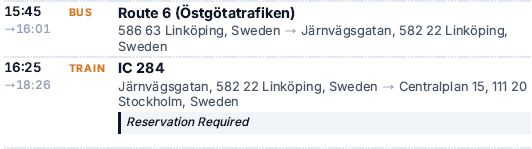
Love the agenda view as a model for how a streamlined view could work on the app and online. I note that non-flight transportation shows up as a single line including both departure and arrival, while flights show up as separate departure and arrival lines.

1777217358788.png

In general, I prefer the single line approach, but some tweaks to the summary (at least for an online/app streamlined view) would be useful. In particular, if I were to glance at this for a rail journey I'd want to see my carriage and seat numbers so I can board the train without having to click through for more details. Additionally, the summary lists the station/stop addresses instead of their names (as demonstrated in the above screenshot). While knowing where the Linköping Central Station is is useful, in the summary I just want to know that it's "Linköping Central Station". The existing online/app view has this correct, but the summary pulls the address instead of the name.

Thanks for improving the non-flight transportation fields during the week. I note that rail doesn't have a spot for train number (although I've used the "Name" field for that in the above screenshot), and no non-flight transportation modes have a spot for operator or route (again, I've used the "Name" field in the above example). Operator is definitely useful in some contexts, where multiple providers serve a station (e.g. Europe).

 
Confirmed: we'll add support for TripIt's "driving directions" item type today, and see if we can back process existing imports.
I can now manually add driving, which is helpful - thanks. I see that TW adds an expected duration to the overall trip view, but doesn't generate a full event end time. An auto end time would help when it comes to calendar sync and agenda view, without me having to go and manually add it based on the estimate that TW is already generating.

Also, less importantly, driving trips are still not populating on TripIt imports, including new imports undertaken today.
 
I'd love more customisable fields to be able to add more details into flight, cruises, hotels etc - i.e. able to edit all the fields that pull across from confirmation emails sent to the Robot - whether from new or editing incorrectly pulled across info.
 
Love the agenda view as a model for how a streamlined view could work on the app and online. I note that non-flight transportation shows up as a single line including both departure and arrival, while flights show up as separate departure and arrival lines.

View attachment 504566

In general, I prefer the single line approach, but some tweaks to the summary (at least for an online/app streamlined view) would be useful. In particular, if I were to glance at this for a rail journey I'd want to see my carriage and seat numbers so I can board the train without having to click through for more details. Additionally, the summary lists the station/stop addresses instead of their names (as demonstrated in the above screenshot). While knowing where the Linköping Central Station is is useful, in the summary I just want to know that it's "Linköping Central Station". The existing online/app view has this correct, but the summary pulls the address instead of the name.

Thanks for improving the non-flight transportation fields during the week. I note that rail doesn't have a spot for train number (although I've used the "Name" field for that in the above screenshot), and no non-flight transportation modes have a spot for operator or route (again, I've used the "Name" field in the above example). Operator is definitely useful in some contexts, where multiple providers serve a station (e.g. Europe).

Work in progress today- acknowledged with thanks. Main part is overhauling the various fields we store against different event types.
 
I'd love more customisable fields to be able to add more details into flight, cruises, hotels etc - i.e. able to edit all the fields that pull across from confirmation emails sent to the Robot - whether from new or editing incorrectly pulled across info.
Acknowledged thank you- will work on this today.
 
FEATURE REQUEST @tripwaffle - When a trip is shared with a viewer by email, it would be helpful if the email contains the trip itinerary and also if the receiver can view the information on the website without needing to sign-up.

@tripwaffle sorry if I've missed this, but any further thoughts on when you share a trip with someone who doesn't have TripWaffle that the email contains itinerary and a link to the website with similar information (so if I make changes to say a hotel or flight, they'd see the latest)?

In my mind, this should just have dates of flights with times and flight numbers and accommodation just has hotel info and arrival departure. Ie, no real sensitive info.
 
I can now manually add driving, which is helpful - thanks. I see that TW adds an expected duration to the overall trip view, but doesn't generate a full event end time. An auto end time would help when it comes to calendar sync and agenda view, without me having to go and manually add it based on the estimate that TW is already generating.
Auto end time (based on route estimation) for driving+taxi events is now live. Does not apply to past events (e.g. old imported trips).
Also, less importantly, driving trips are still not populating on TripIt imports, including new imports undertaken today.
Sorry about that: I believe we've now addressed this.
It's been hard to get testing coverage across all the various scenarios e.g. bicycling directions vs driving directions, no start date specified, no end time specified, etc etc etc but we are getting closer.
 
@tripwaffle sorry if I've missed this, but any further thoughts on when you share a trip with someone who doesn't have TripWaffle that the email contains itinerary and a link to the website with similar information (so if I make changes to say a hotel or flight, they'd see the latest)?

In my mind, this should just have dates of flights with times and flight numbers and accommodation just has hotel info and arrival departure. Ie, no real sensitive info.
Just to confirm: you'd like to generate a shareable/public url for a trip that hides any personally identifiable information? (thank you for your feedback btw)
Please give me an example use case too, if you're comfortable with sharing specifics.
 
Just to confirm: you'd like to generate a shareable/public url for a trip that hides any personally identifiable information? (thank you for your feedback btw)
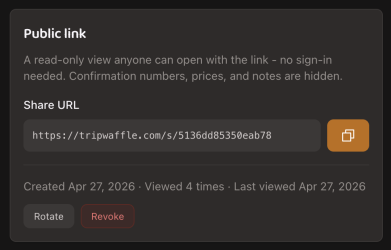
I'll second this feature, a Public Sharing URL is a feature that's in TripIt that I use all the time. I use it to give to friends and family, without them needing a TripIt account, so they know what my plans are, without giving them the ability to change anything or see sensitive info like confirmation numbers or notes I've added. Of course, like much of TripIt, this feature has been left untended for quite some time and still displays in the very old interface that dates back to the 2000s. Happy to send you through a few examples of it, if that'll help.

I've just started playing with TripWaffle the last few days and I'm very impressed. TripIt has been left to rot unfortunately, so a much more modern product is very welcome. TripWaffle is fantastic so far, really appreciate your hard work on it. ☺️
 
@tripwaffle Thanks for a great app, it shows real promise.

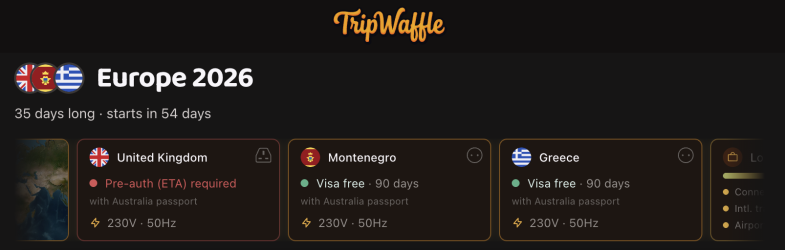
Another value add feature would be to use the passport country in the profile to provide a visa / ETA requirements for each country in a trip.
Something for the backlog? ;)
 
Read our AFF credit card guides and start earning more points now.

AFF Supporters can remove this and all advertisements

Become an AFF member!

Join Australian Frequent Flyer (AFF) for free and unlock insider tips, exclusive deals, and global meetups with 65,000+ frequent flyers.

AFF members can also access our Frequent Flyer Training courses, and upgrade to Fast-track your way to expert traveller status and unlock even more exclusive discounts!

AFF forum abbreviations

Wondering about Y, J or any of the other abbreviations used on our forum?

Check out our guide to common AFF acronyms & abbreviations.
Back
Top